{quote} SESSION FILTER: The session filter checks against broker server time. This ensures the EA only trades during your specified time windows based on your broker's time zone. You can set up to 3 independent sessions, and the EA will automatically close all positions when outside these sessions (if enabled). I added a noise filter. It can be turned on/off!! CANDLE OPEN DELAY: The delay feature acts as a simple noise filter. Instead of entering immediately when a signal appears, the EA waits for the candle to pull back, allowing for better entry...
Ignored
Dear Sagat 1977,
Thank you for your work and energy.
You have given me more than I asked for.
I am very grateful to you.
I will try it out the rest of the day.
{quote} Thanks BestTraderEv, will try to look at it & repair it. if i can solve this, can this iCostum be used for any TF & Intruments like Forex, Gold,Crypto and Stocks too without any problem ? ======== < Edit > ======== i tried to re code it, it is now not freeze ... but the result seems so strange ??? the color Aqua & OrangeRed is the result of MTF ... the color Green & Pink is the result of 1TF. please see attachments below ... Thanks a lot for your help, time & kindness ... {image} *) the single TF code : input double ATRMultiplier = 1.8;...
Ignored
I just don't understand one thing...
Why are you Guys reinventing the wheel??? (you Sagat1977 too!!!)
{quote} SESSION FILTER: The session filter checks against broker server time. This ensures the EA only trades during your specified time windows based on your broker's time zone. You can set up to 3 independent sessions, and the EA will automatically close all positions when outside these sessions (if enabled). I added a noise filter. It can be turned on/off!! CANDLE OPEN DELAY: The delay feature acts as a simple noise filter. Instead of entering immediately when a signal appears, the EA waits for the candle to pull back, allowing for better entry...
Ignored
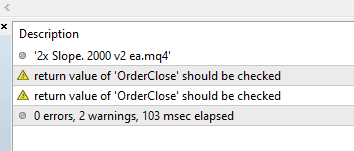
BTW, if you can't fix these warnings, you should not be trying to help others in coding!!!
Attached Image (click to enlarge)
IOW, your codes SHOULD NOT BE TRUSTED!!!
Not to mention all the other mess in that code, like for example defining #property strict and then just wildly using non-strict syntax and mixing it up with some strict syntax!!!
Mixing extern with input, and so on...
.ex4/.ex5 files can't be fixed or modified / I'm not a coder!
{quote} I just don't understand one thing... Why are you Guys reinventing the wheel??? (you Sagat1977 too!!!) {file} @Sagat1977 When you are helping with what others are asking, fine, great! But why reinvent what has been done ages ago???
Ignored
What's this all about? What did I even do wrong? I just messed around with its code a bit and it performed better on the test. It was performing badly anyway from the start, it made no sense at all. So yeah, I shared the test results. Just so he could see the bot got better
I will fix the code!!!
{quote} What's this all about? What did I even do wrong? I just messed around with its code a bit and it performed better on the test. It was performing badly anyway from the start, it made no sense at all. So yeah, I shared the test results. Just so he could see the bot got better I will fix the code!!!
Ignored
It's also about you posting codes like ma ribbon which already exist for ages.
I know, you have discovered how to use AI, and you are having fun!!!
.ex4/.ex5 files can't be fixed or modified / I'm not a coder!
{quote} Dear Sagat 1977, Thank you for your work and energy. You have given me more than I asked for. I am very grateful to you. I will try it out the rest of the day.
{quote} It's also about you posting codes like ma ribbon which already exist for ages. I know, you have discovered how to use AI, and you are having fun!!!
Ignored
All the free Ribbon versions out there right now are pretty crappy and ugly.
They have way fewer EMA lines.
Mine looks much nicer and has more EMA lines.
I originally made it just for myself, but then I shared it with you guys…
in case somebody might want/need it.
{quote} All the free Ribbon versions out there right now are pretty crappy and ugly. They have way fewer EMA lines. Mine looks much nicer and has more EMA lines. I originally made it just for myself, but then I shared it with you guys… in case somebody might want/need it.
Ignored
Maybe you didn't look for other names?
It's not always called "ribbon", and sometimes "ribbon" can mean something different.
Also look up "fan".
.ex4/.ex5 files can't be fixed or modified / I'm not a coder!
{quote} SESSION FILTER: The session filter checks against broker server time. This ensures the EA only trades during your specified time windows based on your broker's time zone. You can set up to 3 independent sessions, and the EA will automatically close all positions when outside these sessions (if enabled). I added a noise filter. It can be turned on/off!! CANDLE OPEN DELAY: The delay feature acts as a simple noise filter. Instead of entering immediately when a signal appears, the EA waits for the candle to pull back, allowing for better entry...
Ignored
Dear Sagat 1977,
Sorry, the EA is not working as I had hoped.
The delay setting works, but the 'close all positions at end trade time' unfortunately does not.
Could you take another look at it?
{quote} Dear Sagat 1977, Sorry, the EA is not working as I had hoped. The delay setting works, but the 'close all positions at end trade time' unfortunately does not. Could you take another look at it? Kind regards.
Ignored
"It works for me. It closes positions at the end of the session. Should I set the session to your home Windows time? Should I rewrite the session code?" Where do you live? Country? State?
{quote} Dear Sagat 1977, Sorry, the EA is not working as I had hoped. The delay setting works, but the 'close all positions at end trade time' unfortunately does not. Could you take another look at it? Kind regards.
Ignored
Are you talking about in Strategy Tester or in real time?
I didn't check that in the code, but it's likely that Sagat coded the real time, and didn't take into account the historical time.
If the closing should work in the tester, the sessions must be recognised in history, too.
.ex4/.ex5 files can't be fixed or modified / I'm not a coder!
{quote} "It works for me. It closes positions at the end of the session. Should I set the session to your home Windows time? Should I rewrite the session code?" Where do you live? Country? State?
Ignored
Dear Sagat1977,
I think our emails overlapped.
I am currently backtesting your latest version (version 3).
Once I am done with that, I will let you know.
Kind regards.
KK_ManualTrader Pro v2 – Professional Manual Trading Assistant for MT4-MT5 KK_ManualTrader Pro v2 is a powerful manual trading helper EA designed for active scalpers and discretionary traders. Main features: Adaptive ATR-based SL/TP – automatically sets/changes stop loss & take profit based on current volatility (percentage + ATR scaling) Trailing Stop – normal server-side or hidden (broker can't see it) Hidden trailing stop - Fixed stop loss stays in place and visible. Very fast hotkeys: • 1 → Instant Reverse (closes everything and opens opposite direction with same volume) • 2 → Close everything on current chart • 3 → Close ALL positions (all symbols) • 4 → Toggle trailing on/off Real-time display of: • Current spread • RSI (with color warning at extreme levels) • Trailing status (ON/OFF with nice colors) Clean, customizable right-upper corner panel Works well on any symbol/timeframe Perfect for fast manual trading when you want better risk management and quicker execution without turning into a full EA. Ideal for: scalping, news trading, prop firm challenges, aggressive manual style. Simple, lightweight, no martingale/grid. Just pure trading assistant. {file} {file} {image} {image}


 I will code your EAs and Indicators for no charge



 I just messed around with its code a bit and it performed better on the test. It was performing badly anyway from the start, it made no sense at all. So yeah, I shared the test results. Just so he could see the bot got better



