Common SL & TP EA – Manage All Positions with Shared Stop Loss and Take Profit
The Common SL & TP EA helps traders manage their risk and profit targets more easily by controlling all positions of the same symbol with two shared horizontal lines:
The Common SL & TP EA helps traders manage their risk and profit targets more easily by controlling all positions of the same symbol with two shared horizontal lines:
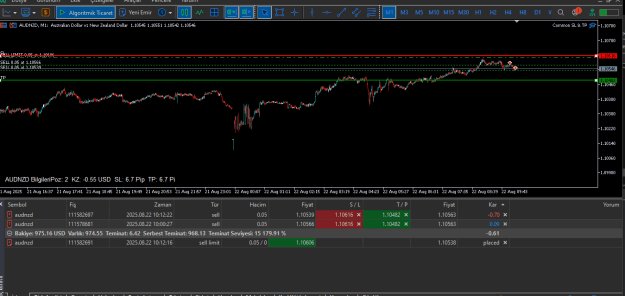
- Common Stop Loss Line (Red): Drag it on the chart to instantly update the SL of all open trades.
- Common Take Profit Line (Green): Drag it on the chart to instantly update the TP of all open trades.
- Info Panel: Displays current positions, profit/loss, SL & TP distance in pips, and expected profit/loss at current SL/TP levels.
Key Features
- Works on any symbol and timeframe
- Automatically calculates pip values depending on symbol digits
- Drag & Drop SL and TP lines directly on the chart
- Updates all open trades in real time
- Clear and customizable Info Panel (font, color, size, corner position)
- Supports multiple positions per symbol
- Lightweight and user-friendly
Parameters
- DefaultPipsOffset – Default distance (in pips) of SL/TP lines from the market price when loaded
- SL_Color / TP_Color – Line colors
- LineWidth – Line thickness
- PanelCorner / PanelXOffset / PanelYOffset – Info panel placement
- PanelTextColor / PanelFontSize / PanelFont – Info panel customization
How to Use
- Attach the EA to the chart of your chosen symbol.
- SL and TP lines will appear automatically at a default offset.
- Drag the lines to adjust. All trades on this symbol will be updated immediately.
- Monitor current profit, expected profit, and risk in the info panel.
Note: The EA modifies only trades of the attached symbol.
https://www.mql5.com/en/market/product/147764
Attached Image (click to enlarge)
1