{quote} Everything is working fine on my side! Please don't change the file name!!! Please check if you don't have something like "(1)" in your file name!!!
Ignored
Hi,
I did not changed the file name and also there is no (1) or (2) etc. in the file name. The file in this post https://www.forexfactory.com/thread/...2#post14235512
was working perfectly. I was testing it on demo account without of any issue. Then I asked you for some new update and you provided this new file in this post https://www.forexfactory.com/thread/...8#post14235628
I added this new file but at first it showed up on chart but after just few minutes it vanished and never show again. I tried deleting and re adding it but it did not show up.
Then I downloaded again the previous version from this post which was working perfectly before https://www.forexfactory.com/thread/...2#post14235512
But it also started to no show up. I tried all methods like restarting MT4, Restarting PC and deleting and re adding indicator. But none of these method worked.
{quote} Hi, I did not changed the file name and also there is no (1) or (2) etc. in the file name. The file in this post https://www.forexfactory.com/thread/...2#post14235512 was working perfectly. I was testing it on demo account without of any issue. Then I asked you for some new update and you provided this new file in this post https://www.forexfactory.com/thread/...8#post14235628 I added this new file but at first it showed up on chart but after just few minutes it vanished and never show again. I tried...
Ignored
You didn't do one thing that I wrote about!
Check and delete those before you put the indi on the chart!!!
{quote} You didn't do one thing that I wrote about! Check and delete those before you put the indi on the chart!!! {image}And, just in case, download this one: {file}
Ignored
Hi Sir,
I tried it and it started showing up again. Thank you for this.
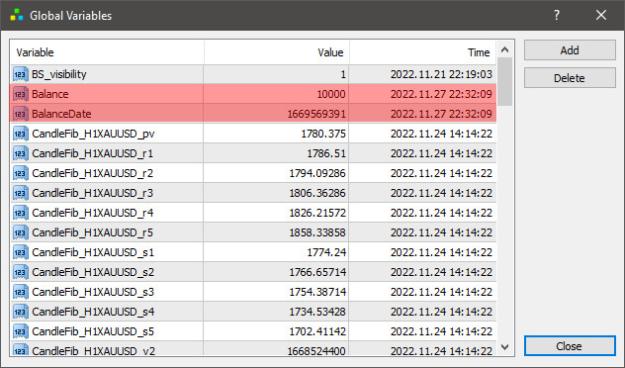
But there is an issue. If I set Reset data at hour=True and set reset at say 23:00. Then if I click on "Get Data" then it saved the current balance. And keep on working fine as long as MT4 is open. If i close Mt4 and open Mt4 again. Then it again shows "Get Data" button and if i click on it then it again save new current balance value. In this way every time it resets on its own whenever i restart the MT4.
In the previous version there was not such issue occurring. Here is link to previous version file https://www.forexfactory.com/thread/...2#post14235512
Please try to resolve this issue in the newer version please
{quote} Hi Sir, I tried it and it started showing up again. Thank you for this. But there is an issue. If I set Reset data at hour=True and set reset at say 23:00. Then if I click on "Get Data" then it saved the current balance. And keep on working fine as long as MT4 is open. If i close Mt4 and open Mt4 again. Then it again shows "Get Data" button and if i click on it then it again save new current balance value. In this way every time it resets on its own whenever i restart the MT4. In the previous version there was not such issue occurring. Here...
Ignored
Well, I am sorry, but this one has to be like this.
When you close the MT4, the Global Variables have to be deleted and that means that you must have MT4 running in order for this to work. If you leave those GV's when you close the MT4, then you will face the other issues when you open the MT4, you won't see anything.
.ex4/.ex5 files can't be fixed or modified / I'm not a coder!
{quote} Well, I am sorry, but this one has to be like this. When you close the MT4, the Global Variables have to be deleted and that means that you must have MT4 running in order for this to work. If you leave those GV's when you close the MT4, then you will face the other issues when you open the MT4, you won't see anything.
Ignored
Hi Sir,
But your previous version file works fine in this case. Even if i close Mt4 and open it again then it has saved the previous account balance. Such issue does not exist in the previous version file.
Sometimes I have to shutdown my PC and I can not keep it up ON all the day. So, please make changes in the new file as you did in the previous version
{quote} Hi Sir, But your previous version file works fine in this case. Even if i close Mt4 and open it again then it has saved the previous account balance. Such issue does not exist in the previous version file. Sometimes I have to shutdown my PC and I can not keep it up ON all the day. So, please make changes in the new file as you did in the previous version
Ignored
Then you should rent a VPS and run your scripts on VPS.
.ex4/.ex5 files can't be fixed or modified / I'm not a coder!
{quote} Then you should rent a VPS and run your scripts on VPS.
Ignored
Hi Sir,
I have thought a solution for this problem.
There should be a another indicator which should have the following simple task:
When I click on it then it should save the current balance value
Then whenever MT4 is opened its task should be to replace this saved balance value in global variable. In this way reset issue will be resolved in AccountBalanceEquityChange.
Button of this new indicator should disappear after i click on it. It should appear again on its own after a specified time.
Please sir look at this, If it is possible by coding then please do this.
{quote} Hi Sir, But your previous version file works fine in this case. Even if i close Mt4 and open it again then it has saved the previous account balance. Such issue does not exist in the previous version file. Sometimes I have to shutdown my PC and I can not keep it up ON all the day. So, please make changes in the new file as you did in the previous version
Ignored
I need at least a week's break from this one!
And, you owe me a million dollars!
{quote} Hi Sir, I have thought a solution for this problem. There should be a another indicator which should have the following simple task: When I click on it then it should save the current balance value Then whenever MT4 is opened its task should be to replace this saved balance value in global variable. In this way reset issue will be resolved in AccountBalanceEquityChange. Button of this new indicator should disappear after i click on it. It should appear again on its own after a specified time. Please sir look at this, If it is possible by...
Ignored
Please don't tell me what to do!!! You are being insolent, and I really don't know why I am still helping you out! If you know what should be done, you do it yourself, and don't waste any more of my time!
.ex4/.ex5 files can't be fixed or modified / I'm not a coder!
{quote} Please don't tell me what to do!!! You are being insolent, and I really don't know why I am still helping you out! If you know what should be done, you do it yourself, and don't waste any more of my time!
Ignored
Sorry Sir If I have hurt you. I am very thankful to you for helping me.
If you don't mind sir I want one last update:
In EPL% please show percentage by using this formula (Equity Now - Previous Balance)*100/Previous Balance. Currently it is showing percentage by this formula (Equity Now - Balance Now)*100/Balance Now
Please replace these text labels BPL%: and EPL%: and instead of these write this TA %: in both of these.
can someone fix this the white dot doesn't appear .. I want the dot to be appeared when new signal comes.. it only appear when you reattach the indicator and I want the white dot appear without reattach the indicator or change tf
{quote} I think I figured out what you were talking about. I only fixed the Rsioma line OB/OS crosses alerts. Those alerts were coded for the slower Marsioma line, so I changed that. I can see that the other part of the histogram at the bottom could be also improved, but that will take more time. Or, maybe it was just a different idea? Because those green/red histograms seem to follow the slower Marsioma? {file}
Ignored
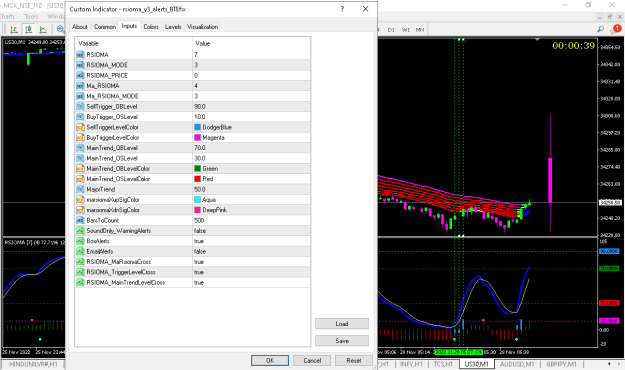
checked on US30 M1 chart.
no alerts generated on trigger levels cross
Attached Image (click to enlarge)
1st vertical line : RSIOMA_MaRsioma cross alert generated
2nd vertical line : BuyTrigger_OSLevel cross...... alert not generated
3rd vertical line : MainTrend_OSLevel cross ..... alert not generated
BestTraderEv, can you please have a look at the code again?
thanks in advance
{quote} Please don't tell me what to do!!! You are being insolent, and I really don't know why I am still helping you out! If you know what should be done, you do it yourself, and don't waste any more of my time!
Ignored
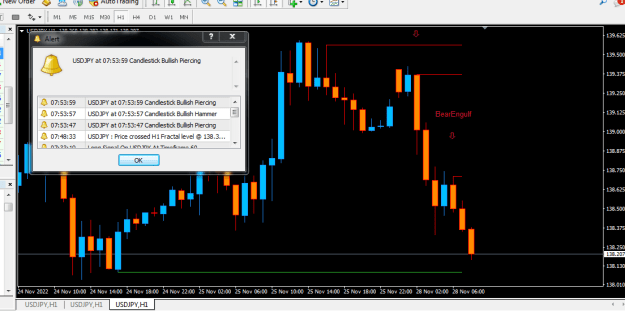
Thanks for yesterday please educate me any idea why the candlestick signal will display a bullish alert while its in the sell mode? For instance as at 7;53am this morning it gave the alert as attached screenshot.Thanks
{quote} Thanks for yesterday please educate me any idea why the candlestick signal will display a bullish alert while its in the sell mode? For instance as at 7;53am this morning it gave the alert as attached screenshot.Thanks {image}
Ignored
Please Best kindly assist to convert it to mt5 cos of the alert the other one mt5 you posted is working fine as well but got no alert.thanks
{quote} Thanks for yesterday please educate me any idea why the candlestick signal will display a bullish alert while its in the sell mode? For instance as at 7;53am this morning it gave the alert as attached screenshot.Thanks {image}
Ignored
I have tried this indi and found it repaints. It will send you a notification when a pattern is formed, but then price runs and that pattern becomes incorrect, it will clear itself on chart.
{quote} {quote} Hi BestTraderEv, hope you can help me 3rd time on this History Export Script below as I had been trying countless time but yet failed. I created a simple export script as follows :- int mxBar=100; int TF=60; int start() { int handle; handle=FileOpen("history.csv", FILE_CSV|FILE_WRITE, ','); if(handle>0) {for(int i=1; i<=mxBar; i++) FileWrite(handle,i, TimeToStr(iTime(Symbol(),TF,i),TIME_DATE|TIME_SECONDS), Symbol(), iBarShift(Symbol(),1440,iTime(Symbol(),TF,i),true), // Shift# of D1 DoubleToStr(iClose(Symbol(),TF,i),5) ); FileClose(handle);...
Ignored
Hope ypu are managing with your script!
I really don't have time to check everything, but I had this thought at night, that the function I posted you wasn't exactly correct. It would work most of the days, but I did not consider that there can be an instance when the first candle of the day is also the first day of the new month, or in general, it will not be a day < than the day before.
So, we don't really need that, because we must consider only the minimal necessary condition, which is that the first candle of the day must belong to a new day number so a diffrent day number than the candle before.
So, like this:
In EPL% please show percentage by using this formula (Equity Now - Previous Balance)*100/Previous Balance. Currently it is showing percentage by this formula (Equity Now - Balance Now)*100/Balance
Ignored
No, that is not the formula.
I wrote about it earlier!!!
The formula is like this:
First I calculate the overall Balance Profit/Loss like this: BPL=PrevBalance+(CurrBalance-PrevBalance);
Then I calculate the Equity Profit/Loss like this: EPL=BPL+(CurrEquity-BPL);
That's the reason why the Equity label has 3 color states. Loss color when Equity is overall in Loss. Profit color when Equity is greater than the largest of the Balance values. Neutral color when Equity is smaller than CurrBalance, but bigger than the PrevBalance.


 I will code your EAs and Indicators for no charge