{quote} Sorry, that's not a job for me. Please ask someone else. But, maybe this one is already what you are looking for: https://www.mql5.com/en/code/10697
Ignored
Thanks so much sir for your quick response and for the links God bless many times
Kind regards sir
{quote} Hi....jeanlouie...im back again.... BEST TEMPLATE SWITCHER EVER.... Following Indi that you made do not reload after change template. {file} I mean.....when I press the button to change template it will change it but the indicator will disappear so can not change anymore template... hope i explain clearly what I mean... I think is something wrong with this {image} https://www.forexfactory.com/thread/...5#post13060455 Can you please check it out... THANK YOU VERY MUCH
Ignored
I recall the indicator needs to be saved on the template that you are clicking to as well. When the indicator is saved on both x and y/andmore templates, then switching between x and y is fine.
{quote} So I gave you the codes! You do the iHighest and iLowest in the EA, and in the EA you also check if there is the signal on the indicator. You need to look for the text objects which are already plotted on the chart, read their time, and you can get the index by that time, and you can read the high or low price of that index. Of course, you can get the text of the object and/or the color.
Ignored
I'd like to code like you, but I'm a noob. It's so easy to read.
Quote
Disliked
And yes, I did misunderstand, because "symbol" in trading context mean the the name of the instrument. And you were referring to the text label on the chart.
Yes, my bad, sorry for that!
Quote
Disliked
In your code snippet: if ( lowest == "LL" ) signalSell=true; lowest is a double - correct? So, lowest == "LL" makes no sense. You need to search in the loop of 50 candles for an object with the string "LL". Read the time of that object. Get the index of that time. Get the Low[index]; Adn then: if ( lowest == Low[index] ) signalSell=true;
So...I made last candles check on high/low.
I made a loop on the same candles back to search "HH" , if I got something ">0" , give me the time by ObjectGetInteger and tell me which bar is it "iBarShift" , but I don't get any value. Somewhere something missing?
{quote} Why reinvent the wheel? Or, why try to kick in a door that's already open? This one - looks like mladen's job: {file} And this one even has the symbol and timeframe in the alerts.
Ignored
Thanks so much sir for showing me an open door
this is exactly what i want
I am so grateful to you all
You are simply the Best
Cheers
For all of you Stoch lovers, here is one with 4 types of crosses. Of course, it will only display one type at a time, even if all 4 are set to true. The type displayed will be shown in the indicator name in the subwindow. {file}
I would like to request your assistance in creating a Bollinger Band indicator with alerts.
The Alerts should work as follows.
1. Bullish CSKA - this is when a candle manages to cross and close above the mid BB.
2. Bearish CSKA - this is when a candle manages to cross and close below the mid BB.
3. Bearish Momentum - When a candle manages to cross and close below the lower BB line.
4. Bullish Momentum - When a candle manages to cross and close above the high BB line.
Thanks in advance traders
"You can't buy the bottom, nor sell the top. The best you can strive for is
{quote} I'd like to code like you, but I'm a noob. It's so easy to read. {quote} Yes, my bad, sorry for that! {quote} So...I made last candles check on high/low. I made a loop on the same candles back to search "HH" , if I got something ">0" , give me the time by ObjectGetInteger and tell me which bar is it "iBarShift" , but I don't get any value. Somewhere something missing? {file}
Ignored
OK, so I took a closer look at your code, and here is the effects:
We need to systematise the Indi with the EA, because we are looking for a text object, so to make things easy, we need to make sure that in the EA we are looking for the correct name. So I made the Indi consistent with what the EA is looking for.
When we have identified the highest high and the lowest low in the given candle range, and we have the index, we can now simply look if there is a label by the name "statusLabel"+TimeToString(Time[highindex]) - this name needs to be consistent with the Indi. So, we just do this:
Inserted Code
      // Look for HH label with the same time ID as highest
         name = "statusLabel"+TimeToString(Time[highindex]);
         if(ObjectFind(0,name)==0&&ObjectGetString(0,name,OBJPROP_TEXT)=="HH")
            {
             // set the signals
             // don't forget to reset the signal when not needed

             Comment("HH " + IntegerToString(highindex));
            }
If we don't standardise the name, it will not delete the objects, and there will be a mess.
If you want to know why, it is because the Indi was coded in the older version, where "statusLabel"+Time[shift] resulted in a name like statusLabel+the number of seconds elapsed from 0 hours of January 1, 1970.
While in the new MQL4 version this will return statusLabel+date in date format.
PS. I see that the indicator still needs some work on it.
{quote} OK, so I took a closer look at your code, and here is the effects: We need to systematise the Indi with the EA, because we are looking for a text object, so to make things easy, we need to make sure that in the EA we are looking for the correct name. So I made the Indi consistent with what the EA is looking for. When we have identified the highest high and the lowest low in the given candle range, and we have the index, we can now simply look if there is a label by the name "statusLabel"+TimeToString(Time[highindex]) - this name needs to...
Ignored
Wow! Just put a lil piece of TimeToString code in the indi and we can read the candles time in string format. Clever and easy way!
Thank you very much!
With that "reset the signal" you mean ?
{quote} Wow! Just put a lil piece of TimeToString code in the indi and we can read the candles time in string format. Clever and easy way! Thank you very much! With that "reset the signal" you mean ?return;
Ignored
The EA will place an order, correct?
So, if an order is placed successfully, the signal should be reset to false.
Take a closer look how I reorganised the EA code.
We define the variables in the very begining.
There you have the initial states:
Inserted Code
      bool buysignal  = false;
      bool sellsignal = false;
So, under the if condition of the ObjectFind() you will set one of those signals to true.
Then you can use this signal further:
Inserted Code
if(buysignal)
{
DoThis();
}
When DoThis(); is successful, you need to reset buysignal=false;
Because if you don't reset this variable, it will be true all the time.
return; does not reset anything, it just returns the OnTick() function back to its begining.
Basics.....
If you don't know the basics of how this works, it is pretty unreasonable to try to mess with codes.
It's like trying to tell something in Chinese to an only English speaking person who doesn't know any Chinese and has no interpreter.
.ex4/.ex5 files can't be fixed or modified / I'm not a coder!
{quote} The EA will place an order, correct? So, if an order is placed successfully, the signal should be reset to false. Take a closer look how I reorganised the EA code. We define the variables in the very begining. There you have the initial states: bool buysignal = false; bool sellsignal = false; So, under the if condition of the ObjectFind() you will set one of those signals to true. Then you can use this signal further: if(buysignal) { DoThis(); } When DoThis(); is successful, you need to reset buysignal=false; Because if you don't reset this...
Ignored
I started to learn this stuff months ago, so I am newbie, just trying to learn more. I know some basics still missing, but nobody can learn something new without missing things.
Btw, to code works on both side. Now time to put things together and let's see what it will cook to me.
Joined Oct 2017
|
Status: God is running everything
|74 Posts
I would like to have an indicator to display "Current running profit/loss".
Of course we can easily watch it from 'Trade' section under 'Profit' column. I want to see in BIG font size to be displayed on Chart section. I have i-Profit tracker indicator but there is no option to increase its font size (image attached). I just want to have Current open position's Total profit/loss to be displayed.
Why I need this because I am testing on an EA which trades continuously whenever I see reasonable profit - then I will close all trades. (Also depends on the situation like major data release, n so on). I want to see it ON FACE!! not in small font size at the corner of my window!
{quote} I started to learn this stuff months ago, so I am newbie, just trying to learn more. I know some basics still missing, but nobody can learn something new without missing things. Btw, to code works on both side. Now time to put things together and let's see what it will cook to me.
Ignored
The indicator is still not working right, it does not delete the old labels when new ones repaint.
This makes it unusable for the EA.
Need to fix that!
.ex4/.ex5 files can't be fixed or modified / I'm not a coder!
Hello BestTraderEV and my fellow traders, I would like to request your assistance in creating a Bollinger Band indicator with alerts. The Alerts should work as follows. 1. Bullish CSKA - this is when a candle manages to cross and close above the mid BB. 2. Bearish CSKA - this is when a candle manages to cross and close below the mid BB. 3. Bearish Momentum - When a candle manages to cross and close below the lower BB line. 4. Bullish Momentum - When a candle manages to cross and close above the high BB line. Thanks in advance traders
{quote} The indicator is still not working right, it does not delete the old labels when new ones repaint. This makes it unusable for the EA. Need to fix that!
Ignored
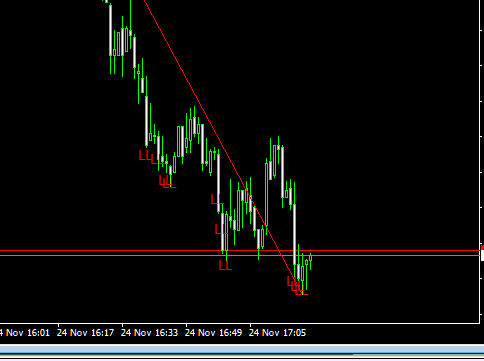
Ohh yea I see, you mean this:
Attached Image (click to enlarge)
Not a problem, I have another zigzag indi. Just modify it like you show me and it's done.
I tested that indi too and it delete old repainted labels.


 I will code your EAs and Indicators for no charge

 It's so easy to read.