Good Day Master Coders, thank you for your help in this thread, sorry i have tried to crop this, i dont know the code to help manage space when posting code Please i am in need of a pending Script, and the one i find is not working properly (i mean to pend one order at a time) when i edit the parameters before applying to chart it wont work, when i apply the way it is, it will pend 3 orders i want to correct the buy/sell what should i change in the code to achieve( 1 pending order at a time with my desired parameters) i also appreciate if anyone...
{quote} The Buy case: #property show_inputs //#property show_confirm extern double Lots = 0.01; extern int Slippage = 3; extern int Stop_Loss = 200; extern int Take_Profit = 30; //global double Poin; //+------------------------------------------------------------------+ //| script "Open a new Buy Order" | //+------------------------------------------------------------------+ int start(){ double Price = WindowPriceOnDropped(); bool result; int slippage; double Price1; double take_profit1; double stop_loss; if (Point == 0.00001) Poin = 0.0001; else...
Ignored
Thanks so much Sir, it works !
am sorry i have additional situation, in the code theres buylimit, buystop, but when i apply to the chart it shows only buylimit, there was no option to change or choose if i want buystop,
please can you help to seperate the code in two? so that i have two script (1 for buystop, and 1 for buylimit) i will try to do same with sellstop and sell limits
{quote} Thanks so much Sir, it works ! am sorry i have additional situation, in the code theres buylimit, buystop, but when i apply to the chart it shows only buylimit, there was no option to change or choose if i want buystop, please can you help to seperate the code in two? so that i have two script (1 for buystop, and 1 for buylimit) i will try to do same with sellstop and sell limits
Ignored
Do you know the purpose of the script? It sets a pending order at the price in which you drop the program.
The script decides what has to be done: buy stop or buy limit. It depends on where you drop it.
{quote} Have you tried using Jagzfx multiplexer, VWAP is normal input, MA as filter input.
Ignored
eess,
As we know, the MUX receive different signals (several inputs) but it has one output only like All agree, Majority Agree, etc, and unfortunately it does not help in this case since PIN One will be in charge to read the two buffers, one from the VWAP section and another from the Moving Average section, sending the cross signal to the MUX in order to go through the first filtration layer and later the MUX will send this cross signal to the EA to continue with the filtration process, validating this signal (if this signal is good), to finally enter and manage the trade. In other hand Pin ONE can read several buffers but no more than one Indicator at the same time, that is why is needed one indicator with two buffers.
I thank very much in advance to the Master Coders.
{quote} do you know the purpose of the script? It sets a pending order at the price in which you drop the program. The script decides what has to be done: Buy stop or buy limit. It depends on where you drop it.
Ignored
oooh)))) what a novice i am , thanks so much for the correction!!
PLEASE CAN YOU TEACH ME THE CODE YOU USE TO BRACKET THOSE CODE TO ECONOMIZE SPACE?
{quote} oooh)))) what a novice i am , thanks so much for the correction!! PLEASE CAN YOU TEACH ME THE CODE YOU USE TO BRACKET THOSE CODE TO ECONOMIZE SPACE?
Ignored
No sure what you mean. Which part of the code do you need to understand?
{quote} eess, As we know, the MUX receive different signals (several inputs) but it has one output only like All agree, Majority Agree, etc, and unfortunately it does not help in this case since PIN One will be in charge to read the two buffers, one from the VWAP section and another from the Moving Average section, sending the cross signal to the MUX in order to go through the first filtration layer and later the MUX will send this cross signal to the EA to continue with the filtration process, validating this signal (if this signal is good), to...
Ignored
Well, I still feel the ONE PIN with/without the multiplexer can do the job, anyway if you are convinced cannot, then hope someone else is willing to help you program it, I will give this a pass.
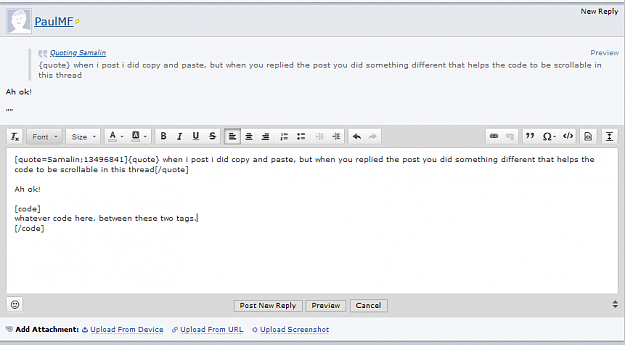
{quote} when i post i did copy and paste, but when you replied the post you did something different that helps the code to be scrollable in this thread
eess, Yes, I am convinced, I tried even with the new updated version of Pin ONE 1.04. Thank you very much!
Ignored
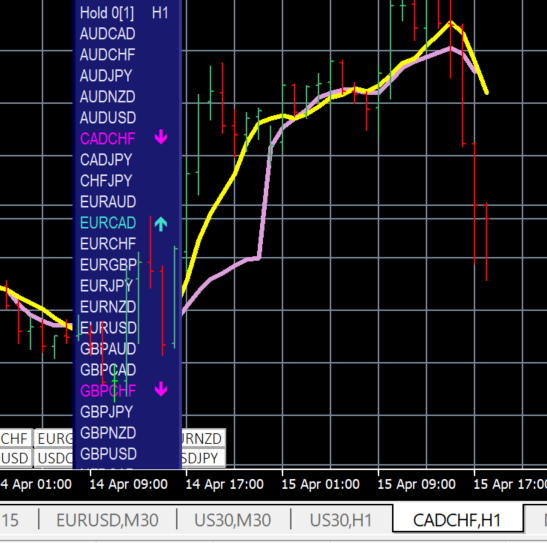
SMA(7) Crosses VWAP on CADCHF, using only ONE PIN, no changes made to your source code. My last attempt to help you. If what you requested for is not moving average, then yes, I agree it cannot be done without changes to source code. But I'm saying it can be done is because your other indicator happens to be moving averages which is already catered for in ONE PIN. And if your use case is you need price to be above/below VWAP and also moving averages, then it can still be done with the inclusion of multiplexer.
Thank you for trying to work with me I really appreciate it.
In my understanding, pin One can send a cross signal when "VWAP (line A) crosses the Moving Average of line A", that means that this is a crossing signal between VWAP and it's own MA but not the "MA of the price" that has a different trajectory and values.
Please, correct me if I am wrong, I really need help with this approach.
I would like a ea that buys when 8 ma crosses the 21 ma above the 200 and 50 ma, or sells when the 8 ma crosses over the 21 ma below the 50 and 200 ma. also would like to be able to put how many pips to allow for take profit and stop loss for each trade
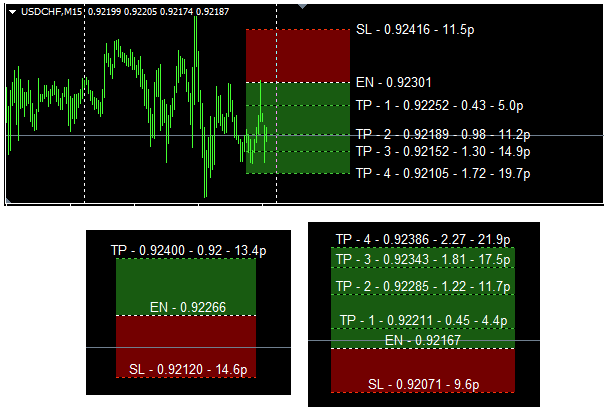
{quote} ...the blue and red lines could adjust at the same time and length of the rect...text could be adjustable so that it can be placed in the middle or the right of the box. and if its possible. a hide/show button so we can make the box and the 3 lines and text invisible when we want...
Risk_Reward_Box_multiTP
- RR boxes, with rr ratio, and pips
- optional multi tp levels
- manual placement
- texts in middle or on right
- draggable on hover click, values update, recommend to use middle line anchors
- show/hide btn
- stable across tf changing



 I will code your EAs and Indicators for no charge