{quote} Hi , haha your awesome man , i mean the percent of P/L in relation to balance. like if balance is 100$ and its in 1$ profit it would show a 1% profit. cheers
{quote} thank you brother much love! , i think it need a bit of editing. the percent and the p/l occupy the same space. please take a look at screenshot. thanks {image}
Ignored
No Problem. I have put the % below as it will look tidier especially when there are 5 digit profit numbers
Do you have it loaded on one or lots of charts.
I don't have that indicator but I'm happy to load it up and see what it does to my machine.
If you have the source we could look at that as well.
{quote} Spike let me give you the whole setup i want to start trading the 15mins chart using the BLACK DOG strategy based on 15minutes though it can be used on other time frames as well one slice in the strategy says ...Always trade in the direction of the last BLACK DOG ARROW......so thats the big black arrow on my chart, once it signals i wait for another confirmation from another indicator a currency strength dashboard also set to 240mins in the input, once the direction of the 2 agree , i now wait for the indicator we want to convert to ea to...
Ignored
Friend, as the indicator is called, an information dashboard - which shows the strength of the currency pair. Where can I get it?
{quote}
Do you have it loaded on one or lots of charts.
I don't have that indicator but I'm happy to load it up and see what it does to my machine.
If you have the source we could look at that as well.
{quote} thanks , in the new version the position inputs x/y/corner has no effects on it! can that be corrected as well?
Ignored
IGNORE Globalvariable if you want.
Yes you are correct. There is something funny going on where the values are not being used correctly, since I added % value. It is such an easy bit of code but I had to hard code the values in to get it to work.
Just for now can you create a GlobalVariable x & y values x=10 & y=50 that will put it in the top left x=1400 ish will put it in the right corner.
You only need to do this once and all screens will use that value. Its the way I am using it.
I will get to the bottom of this as its bugging me.
Looks like you have to choose a timeframe (TF) e.g. H1 or D1 see note as the first item on Inputs.
My MT4 also hung and when I restarted I chose H1 and it works ok.
Maybe start with one TF and add extra ones you want.
There is a hell of a lot of code in there to execute for all TF's so its not surprising its hanging.
Yep just added D1 and ZigZags and its running ok. Let me know if its any different for you.
{quote} IGNORE Globalvariable if you want. Yes you are correct. There is something funny going on where the values are not being used correctly, since I added % value. It is such an easy bit of code but I had to hard code the values in to get it to work. Just for now can you create a GlobalVariable x & y values x=10 & y=50 that will put it in the top left x=1400 ish will put it in the right corner. You only need to do this once and all screens will use that value. Its the way I am using it. I will get to the bottom of this as its bugging me. Editted...
When you add the indicator to the chart go to inputs. Where you see something like D1;H1;m15 delete all the entries and type what you want separated by semicolon (.
Entries can be;
M1
W1
D1
H4
H1
M30
M15
M5
M1
Just pick one or two to get a feel.
e. g. D1;H4
That's all that is needed to show daily and four hourly, although the display looks confusing to me.
Don't be afraid to ask I am happy to help you.
{quote} When you add the indicator to the chart go to inputs. Where you see something like D1;H1;m15 delete all the entries and type what you want separated by semicolon (. Entries can be; M1 W1 D1 H4 H1 M30 M15 M5 M1 Just pick one or two to get a feel. e. g. D1;H4 That's all that is needed to show daily and four hourly, although the display looks confusing to me. Don't be afraid to ask I am happy to help you.
Ignored
Yeah did all that it didnt work.
Without despair & distraught, focus on Patience to FRESH MOTiVES.
Yes that's screwing my system up. I did manage to get it to work by setting everything that is TRUE to FALSE then turning them back again. I also tried setting up a template for you but that didn't work either.
Have a go at that and see if it works for you. Don't forget to set the Period as well.





 , i think it need a bit of editing. the percent and the p/l occupy the same space. please take a look at screenshot.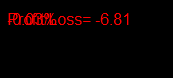


 .
.