You can download it from this link:
https://cdn.tradingfinder.com/file/5...5-by-tflab.zip
 You can also access the MetaTrader 4 version of this Indicator through this page:
https://www.metalsmine.com/thread/13...-trends-easily
 For instructions on how to install:
https://www.forexfactory.com/thread/...-in-metatrader
Prop Firm DrawDown Protector : Prop Firm Capital Protection Expert MT5 |Forex Money Management: Forex Trade Management Expert MT5 | ICT Concepts Indicator MT5 |Smart Money Concepts Expert MT5 | Smart Money Trap Scanner | Get a free Expert Advisor license via Telegram and WhatsApp
How the Braid Filter Indicator Functions
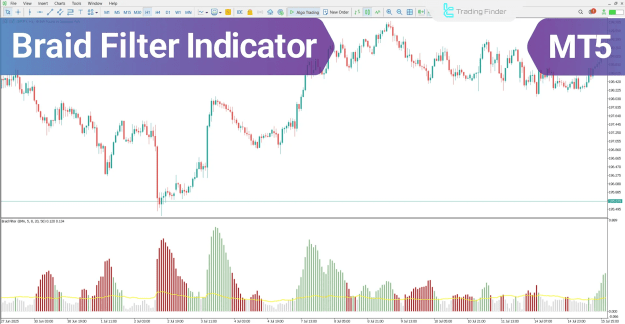
This trading assist MT5 indicator achieves high accuracy in identifying market direction changes by integrating multiple moving averages with an intelligent internal filter. The indicator's output is visualized through a colored histogram and a distinct blue filter line, which together pinpoint valid entry zones for both buy and sell trades.
Key Components of the Braid Filter Indicator
The Braid Filter oscillator uses its visual elements to provide clear, actionable trading signals:
- The Blue Filter Line: This horizontal line acts as the central filter, crucially delineating the boundary between valid and invalid trading zones.
- The Colored Histogram: The position and color of the bars relative to the blue line are decisive for making trading decisions:
- Green bars above the line: These indicate buyer dominance and confirm the price has entered a tradable bullish zone, signaling a potential buy entry.
- Red bars below the filter line: This scenario confirms continued selling pressure, validating the situation as a suitable sell entry opportunity.
Analyzing Market Trends with the Braid Filter
The indicator is designed to provide robust confirmation for both uptrends and downtrends, suitable for various trading styles, including intraday MT5 indicators.
Identifying a Valid Buy-Entry Zone (Uptrend)
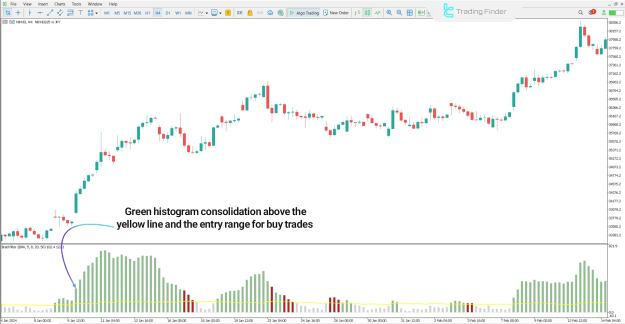
- Signal Confirmation: As seen in charts like the NIKKEI index, the gradual growth of green histogram bars signifies the strengthening of the bullish trend and increasing buying pressure.
- Trading Zone: When these green bars stabilize above the blue filter line, a highly reliable trading zone is formed, representing a strong buy-entry area.
Identifying a Valid Sell-Entry Zone (Downtrend)
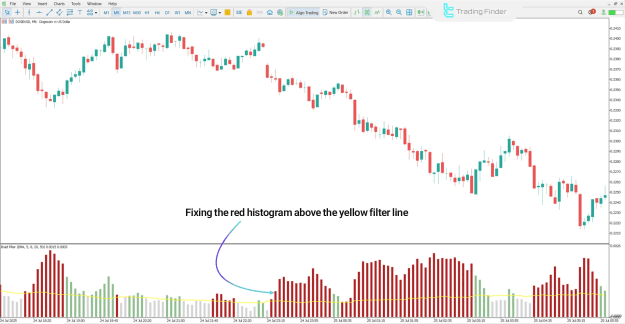
- Signal Confirmation: In assets like Dogecoin (DOGE/USD), an increase in the height of red histogram bars indicates growing selling power and the reinforcement of the bearish trend.
- Trading Zone: A valid zone for entering a sell position is confirmed when the red bars stabilize below the blue filter line, signaling the likely continuation of the bearish trend.
Braid Filter Indicator Settings Overview
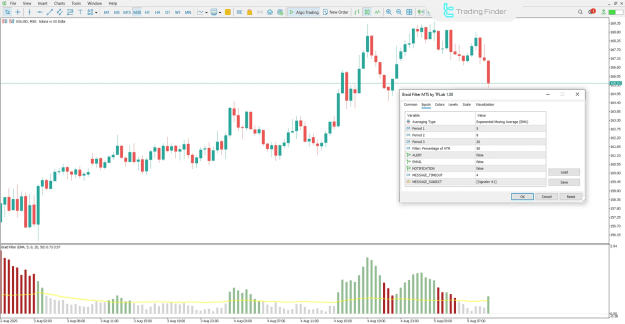
The Braid Filter indicator offers several customizable parameters, allowing traders to fine-tune the tool for different timeframes (Multi-Timeframe MT5 Indicators) and trading instruments (e.g., Forex MT5 Indicators, Crypto MT5 Indicators, Stock MT5 Indicators).
- Core Calculation Parameters:
- MaPeriod1, MaPeriod2, MaPeriod3: Define the periods for the multiple moving averages used in the calculation.
- AtrPeriod: Sets the Average True Range (ATR) calculation period, which is often used for volatility filtering.
- PipsMinSepPercent: Specifies the minimum percentage distance required between lines for a signal to be considered valid.
- ModeMA: Selects the specific moving average type to be used.
- Alerts and Notifications: The indicator supports various alert features, essential for trading assistance:
- Alert: Enables the standard sound alert.
- EMAIL: Allows sending alerts via email.
- Notification: Facilitates sending alerts to a mobile device.
- MESSAGE TIMEOUT: Sets the interval time between alerts.
- MESSAGE SUBJECT: Defines the title of the alert message.
Conclusion
The Braid Filter oscillator stands as a robust reversal MT5 indicator and a valuable momentum indicator in MT5. By effectively combining a system of moving averages with its colored histogram and blue filter line, it reliably identifies strong market movements and defines optimal entry and exit zones, making it an essential tool for traders seeking to filter out market noise.