You can download it from this link:
https://cdn.tradingfinder.com/file/5...4-by-tflab.zip
 You can also access the MetaTrader 5 version of this Indicator through this page:
https://www.metalsmine.com/thread/13...trader-5-tflab
 For instructions on how to install:
https://www.forexfactory.com/thread/...-in-metatrader
Prop Firm DrawDown Protector : Prop Firm Capital Protection Expert MT4 | Forex Money Management: Forex Trade Management Expert MT4 |ICT Concepts Indicator MT4 | Smart Money Concepts Expert MT4| Smart Money Trap Scanner | Get a free Expert Advisor license via Telegram and WhatsApp
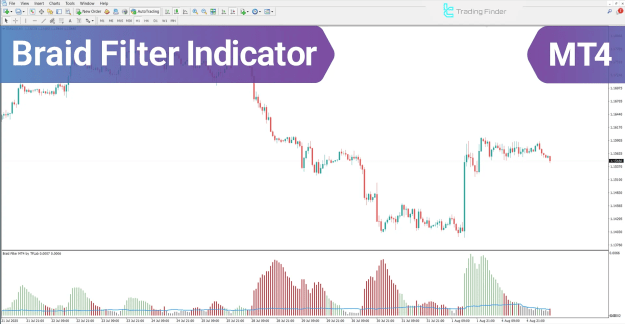
Braid Filter Indicator at a Glance
The Braid Filter indicator's histogram features a distinct blue horizontal line, known as the filter line, which serves as the critical boundary for validating a trading zone. The position of the colored histogram bars relative to this line establishes the main criterion for trade entry or exit:
- Buy Area Validation: When the green bars (signifying an uptrend) are positioned above the blue filter line, the market has entered a confirmed valid trading zone, suggesting a suitable buy entry area.
- Sell Area Confirmation: When the red bars (signifying a downtrend) are positioned below the blue filter line, this action confirms continued selling pressure, providing a suitable environment for initiating a sell position.
Indicator Categories and Applications
The Braid Filter indicator is a versatile tool applicable across various instruments and trading styles, supporting Intraday strategies on the MT4 platform.
- Platform: MetaTrader 4 Indicators
- Trading Skills: Elementary
- Indicator Categories:
- Oscillators MT4 Indicators
- Trading Assist MT4 Indicators
- Momentum Indicators in MT4
- Indicator Types: Reversal MT4 Indicators
- Timeframe: Multi-Timeframe MT4 Indicators
- Trading Instruments:
- Forex MT4 Indicators
- Cryptocurrency MT4 Indicators
- Stock Market MT4 Indicators
- Share Stocks MT4 Indicators
- Commodity Market MT4 Indicators
- Indices Market MT4 Indicators
Indicator in an Uptrend
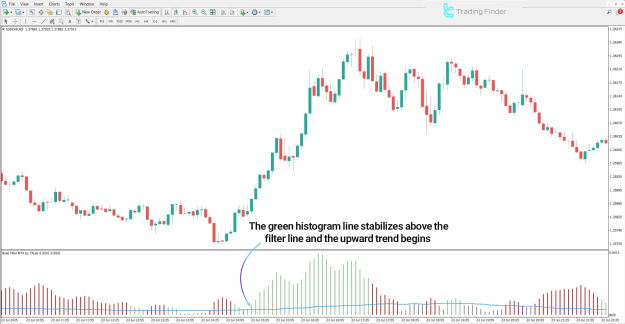
- Analysis: On a chart such as the U.S. Dollar vs. Canadian Dollar (USD/CAD), 5-minute timeframe, increasing height in the green histogram bars indicates growing bullish trend strength.
- Entry Zone: The sustained stabilization of the histogram bars above the blue filter line isolates a reliable zone for buy entries.
Indicator in a Downtrend
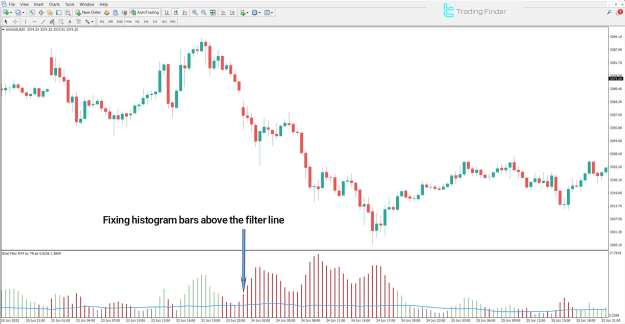
- Analysis: Observing a chart like the Gold Spot Index (XAU/USD), 30-minute timeframe, increasing height in the red histogram bars signals strengthened selling pressure and bearish trend power.
- Entry Zone: The moment the red histogram bars stabilize below the blue filter line, a clear sell-entry zone is successfully formed.
Braid Filter Indicator Settings
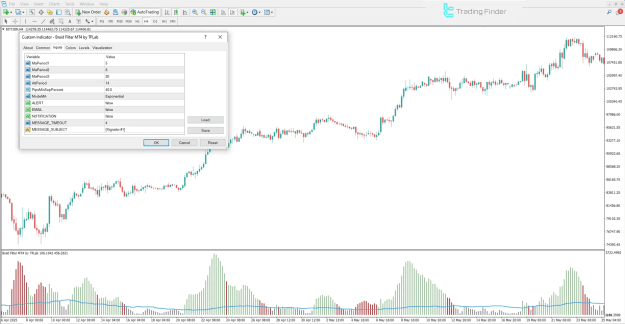
The Braid Filter oscillator offers adjustable parameters within its settings panel, allowing traders to fine-tune the indicator’s sensitivity and alerts:
- MaPeriod1, MaPeriod2, MaPeriod3: The respective periods for the first, second, and third moving averages used in the calculation.
- AtrPeriod: The calculation period for the Average True Range (ATR).
- PipsMinSepPercent: The minimum percentage distance required between lines for signal validity filtering.
- ModeMA: Specifies the type of moving average to be used (e.g., Simple, Exponential, etc.).
- Alert Options:
- ALERT: Enables the sound alert feature.
- EMAIL: Option to send the signal alert to an email address.
- NOTIFICATION: Option to send the alert to a mobile device.
- MESSAGE TIMEOUT: The time interval between consecutive alerts.
- MESSAGE SUBJECT: The title for the alert message.
Conclusion
The Braid Filter indicator is a high-utility tool for effectively identifying strong trends and actively filtering out weak signals (market noise). By integrating multiple moving averages with a colored histogram (green for bullish, red for bearish) and the crucial blue filter line, this trading tool precisely specifies optimized entry and exit points aligned with confirmed market momentum.