You can download it from this link:
https://cdn.tradingfinder.com/file/5...4-by-tflab.zip
 You can also access the MetaTrader 5 version of this Indicator through this page:
https://www.metalsmine.com/thread/13...fied-technical
 For instructions on how to install:
https://www.forexfactory.com/thread/...-in-metatrader
Prop Firm DrawDown Protector : Prop Firm Capital Protection Expert MT4 | Forex Money Management: Forex Trade Management Expert MT4 |ICT Concepts Indicator MT4 | Smart Money Concepts Expert MT4| Smart Money Trap Scanner | Get a free Expert Advisor license via Telegram and WhatsApp
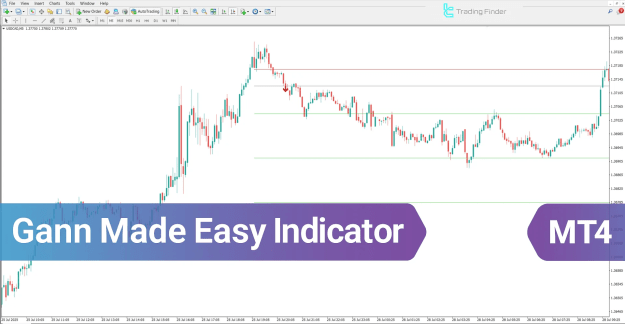
Gann Made Easy Indicator for MT4 – Simplifying Gann Trading Analysis
The Gann Made Easy Indicator for MetaTrader 4 (MT4) is designed to simplify the complex methodologies of Gann trading analysis. This sophisticated technical analysis indicator automatically identifies key trading levels on the chart, removing the need for manual calculations and improving trading accuracy.
Core Functions of the Gann Made Easy Indicator
The indicator provides traders with essential data for strategic decision-making, offering a structured and automated trading approach.
It delivers the following analytical insights:
- Accurate entry points for trade initiation
- Potential price targets based on Gann principles
- Well-defined stop-loss levels for effective risk control
- Buy/Sell signal alerts, indicated by green and red arrows at optimal trading moments
Key Features of the Gann Made Easy Indicator
The Gann Made Easy belongs to several specialized MetaTrader 4 indicator categories, making it ideal for traders who prefer a clear, rule-based analysis model.
- Indicator Categories:
- Signal & Forecast MT4 Indicators
- Trading Assist MT4 Indicators
- Levels MT4 Indicators
- Supported Platform: MetaTrader 4
- Skill Level Required: Intermediate
- Indicator Types:
- Breakout MT4 Indicators
- Reversal MT4 Indicators
- Timeframe Compatibility: Multi-Timeframe
- Trading Style: Intraday Trading
- Applicable Instruments:
- Forex
- Stocks
- Cryptocurrencies
Gann Made Easy Indicator Overview
The Gann Made Easy Indicator automatically analyzes price highs and lows to determine the prevailing market trend, whether bullish or bearish. It then applies Gann angles such as 1:1 and 2:1 to calculate key support and resistance levels.
Based on this analytical framework, the indicator plots entry, take-profit, and stop-loss lines directly on the trading chart.
When the entry conditions are satisfied, a green (buy) or red (sell) arrow alert is displayed, providing the trader with precise execution guidance.
Performance of the Indicator in an Uptrend
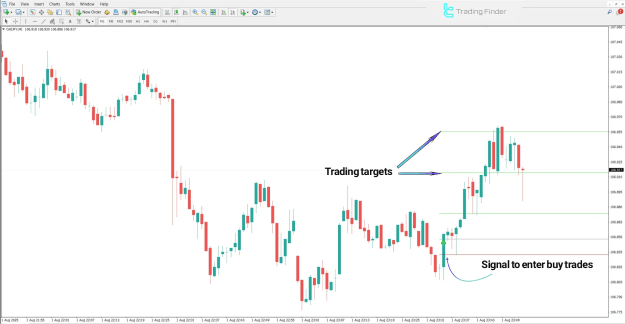
In an uptrend, once the price successfully breaks through a resistance level, the Gann Made Easy Indicator identifies a buy entry zone and provides a complete trade setup.
- The stop-loss is positioned slightly below the most recent swing low to limit risk exposure.
- Price targets are automatically calculated using Gann ratios and levels.
- As the price approaches each target, traders can secure profits incrementally.
Example: On the CAD/JPY (1-minute timeframe), the indicator highlights a breakout signal aligned with Gann-based upward projections, confirming the continuation of the bullish trend.
Performance of the Indicator in a Downtrend
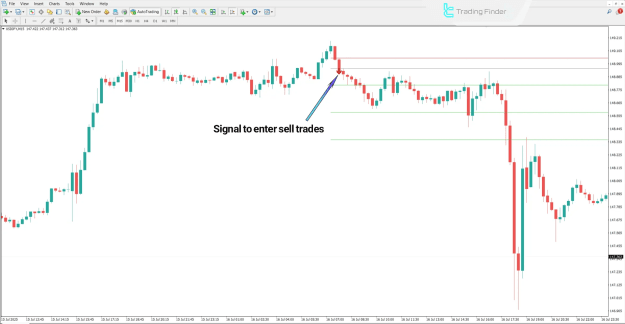
During a downtrend, once a support level is broken, the indicator issues a sell signal marked by a red arrow.
- The stop-loss is placed slightly above the previous swing high.
- Take-profit targets are plotted at lower Gann-defined levels.
- As price declines, the indicator facilitates progressive profit-taking at each support level.
Example: On the USD/JPY (15-minute timeframe), the indicator effectively identifies a trend reversal and generates structured exit points in alignment with Gann principles.
Gann Made Easy Indicator Settings
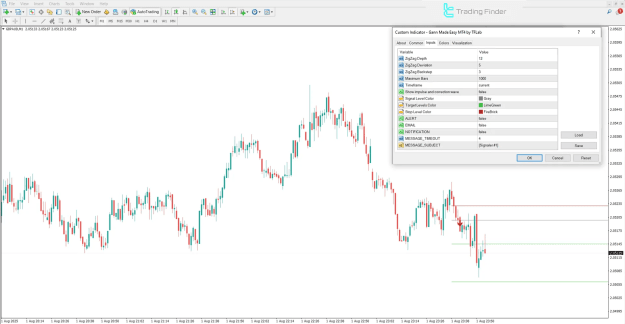
The settings panel of the Gann Made Easy Indicator in MetaTrader 4 allows users to customize analytical parameters for enhanced precision and visual clarity.
Main Parameters:
- ZigZag Depth: Controls the sensitivity of the ZigZag wave formation
- ZigZag Deviation: Adjusts deviation for price wave detection
- ZigZag Backstep: Defines the minimum distance between swing points
- Maximum Bars: Sets the number of candles used for indicator calculation
- Timeframe: Displays the current analytical timeframe
- Show Impulse and Correction Wave: Enables display of impulse and corrective structures
- Signal Level Color: Determines the color of entry signal lines
- Target Levels Color: Defines the color for price target levels
- Stop Level Color: Specifies color for stop-loss visualization
- ALERT: Enables or disables on-screen alert messages
- EMAIL: Sends alert notifications directly via email
- NOTIFICATION: Delivers push notifications to mobile devices
- MESSAGE TIMEOUT: Controls the time interval between alert messages
- MESSAGE SUBJECT: Allows customization of the alert subject line
Conclusion
The Gann Made Easy Indicator for MT4 automates advanced Gann analysis techniques, offering traders a systematic and disciplined approach to the market.
By evaluating trend direction through price highs and lows and computing Gann angles, it automatically generates precise entry, take-profit, and stop-loss levels.
When ideal trading conditions occur, the indicator issues timely entry alerts, supporting traders in executing trades with structured risk management and progressive profit strategies.