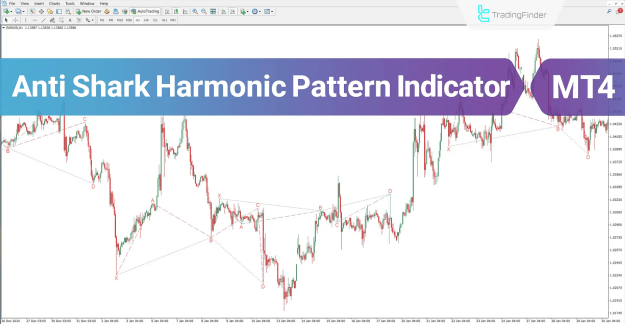
Based on harmonic trading principles, the indicator automatically plots bullish patterns in pink and bearish patterns in dark blue, making it easier to spot high-probability setups.
You can download it from this link:
https://cdn.tradingfinder.com/file/3...4-by-tflab.zip
For instructions on how to install:
https://www.forexfactory.com/thread/...-in-metatrader
TP & SL Tool: Risk Reward Ratio Calculator RRR MT4 | Prop Firm Protector: Trade Assist Prop Firm Plus TF Expert MT4 | Money Management + DrawDown Protector: Trade Panel Prop Firm Drawdawn Limiter Pro MT4 |Get a free Expert Advisor license via Telegram and WhatsApp
Anti Shark Harmonic Pattern Indicator Features
- Indicator Categories: Chart & Classic MT4 Indicators, Harmonic MT4 Indicators, Candlestick MT4 Indicators
- Platform Compatibility: MetaTrader 4 (MT4) Indicators
- Skill Level Required: Intermediate
- Indicator Type: Reversal MT4 Indicator
- Supported Timeframes: Multi-Timeframe MT4 Indicator
- Trading Style: Intraday MT4 Indicator
- Applicable Markets:
- Forex MT4 Indicators
- Stock Market MT4 Indicators
- Share Stocks MT4 Indicators
- Indices Market MT4 Indicators
- Commodity Market MT4 Indicators
- Cryptocurrency MT4 Indicators
Overview of the Anti Shark Harmonic Pattern
The Anti Shark pattern differs from the traditional Shark pattern, particularly in its Fibonacci ratio structure. At points C and D, these ratios follow an opposite approach to the classic Shark:
- The AB ratio is typically less than 1.
- The BC ratio often exceeds 1.618.
This unique ratio setup strengthens the pattern’s role in identifying potential reversal zones.
Bullish Anti Shark Pattern
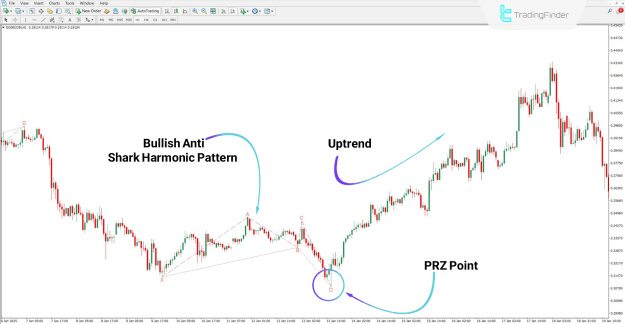
On the Dogecoin (DOGE) one-hour chart, the bullish Anti Shark harmonic pattern completes at point D, which serves as the Potential Reversal Zone (PRZ). From this level, upward momentum often begins, providing opportunities for long entries.
How to Trade Bullish Setups with the Anti Shark Indicator
- Identify point D as the PRZ.
- Wait for bullish confirmation signals.
- Initiate buy positions with appropriate risk management.
Bearish Anti Shark Pattern
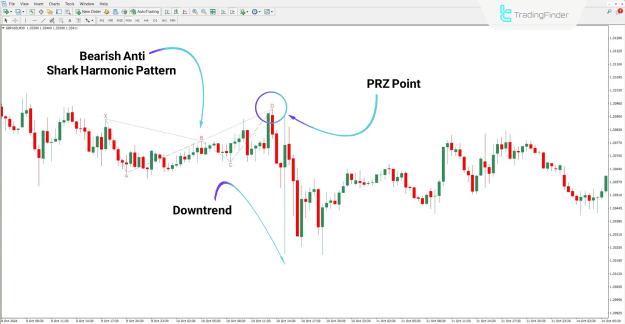
In the GBP/USD 30-minute chart analysis, once the bearish Anti Shark harmonic pattern completes at point D, the market reverses downward. Point D here provides an ideal zone for initiating sell setups.
How to Trade Bearish Setups with the Anti Shark Indicator
- Monitor the completion of the bearish pattern at point D.
- Look for confirmation of downward momentum.
- Open short positions while applying disciplined stop-loss strategies.
Anti Shark Harmonic Pattern Indicator Settings
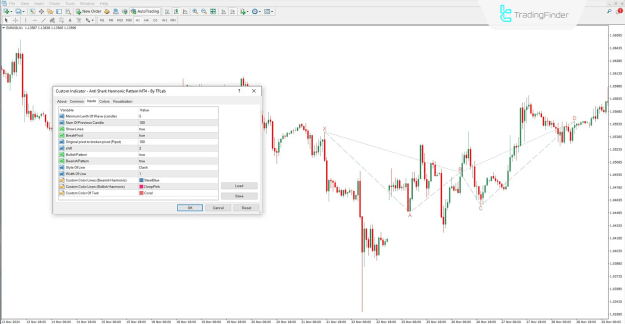
The indicator includes customizable settings to adapt to different trading strategies and preferences:
- Minimum Length of Wave (Candles): Defines the minimum number of candles for wave formation.
- Num of Previous Candles: Determines the past data used for wave identification.
- Show Lines: Option to display or hide pattern lines.
- Break Pivot: Toggles broken line display.
- Original to Broken Pivot (Pipet): Sets distance allowed between pivots.
- Shift: Moves pattern lines forward or backward on the chart.
- Bullish Pattern: Enables or disables bullish Anti Shark display.
- Bearish Pattern: Enables or disables bearish Anti Shark display.
- Style of Line: Adjusts connection lines between points.
- Width of Line: Changes the thickness of pattern lines.
- Custom Colors:
- Bearish Harmonic Pattern
- Bullish Harmonic Pattern
- Text and Labels
Conclusion
The Anti Shark Harmonic Pattern Indicator for MT4 provides traders with a professional tool to identify both bullish and bearish reversal zones. With its flexibility, multi-timeframe compatibility, and customizable settings, it can be seamlessly integrated into various trading strategies across Forex, stocks, indices, commodities, and cryptocurrencies.
By highlighting precise entry and exit points, the indicator enhances decision-making and supports effective intraday trading strategies.