You can download it from this link:
https://cdn.tradingfinder.com/file/3...4-by-tflab.zip
 For instructions on how to install:
https://www.forexfactory.com/thread/...-in-metatrader
TP & SL Tool: Risk Reward Ratio Calculator RRR MT4 | Prop Firm Protector: Trade Assist Prop Firm Plus TF Expert MT4 | Money Management + DrawDown Protector: Trade Panel Prop Firm Drawdawn Limiter Pro MT4 |Get a free Expert Advisor license via Telegram and WhatsApp
Overview of the Breakout Box Indicator
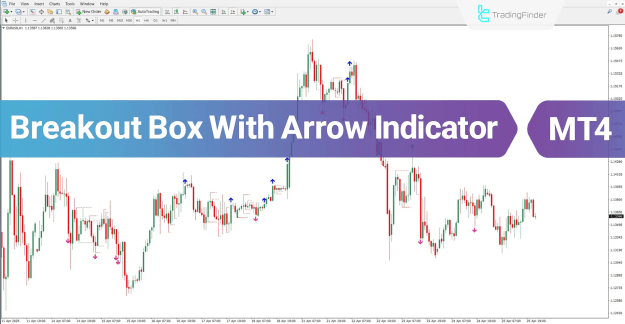
Based on the input parameters configured in the settings panel, the Breakout Box with Arrow indicator draws levels above and below the current price. These levels are represented as boxes on the chart. When a breakout occurs, the indicator visually highlights it, making it easier for traders to act on potential market movements.
Features and Specifications of Breakout Box with Arrow Indicator
Indicator Categories:
- Support & Resistance MT4 Indicators
- Signal & Forecast MT4 Indicators
- Levels MT4 Indicators
Platform Compatibility:
- MetaTrader 4
Trading Skill Level:
- Beginner / Elementary
Indicator Types:
- Breakout MT4 Indicators
- Reversal MT4 Indicators
Timeframes:
- Multi-Timeframe MT4 Indicators
Trading Styles:
- Day Trading MT4 Indicators
- Scalping MT4 Indicators
- Fast Scalper MT4 Indicators
- Swing Trading MT4 Indicators
Trading Instruments:
- Forex MT4 Indicators
- Cryptocurrency MT4 Indicators
- Stock Market MT4 Indicators
- Share Stocks MT4 Indicators
- Indices Market MT4 Indicators
- Commodity Market MT4 Indicators
How the Breakout Box Indicator Works
Trading signals are indicated by arrows:
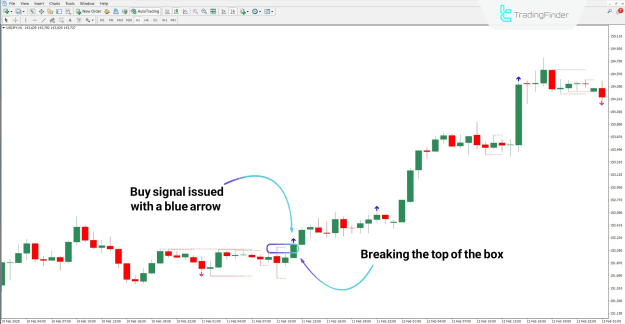
- Buy Signal: When the price breaks above the upper box boundary, a blue arrow appears, signaling a potential buying opportunity. For instance, in a USD/JPY chart, if the price surpasses the defined range with a sharp upward movement, the indicator issues a buy signal at an optimal entry point.
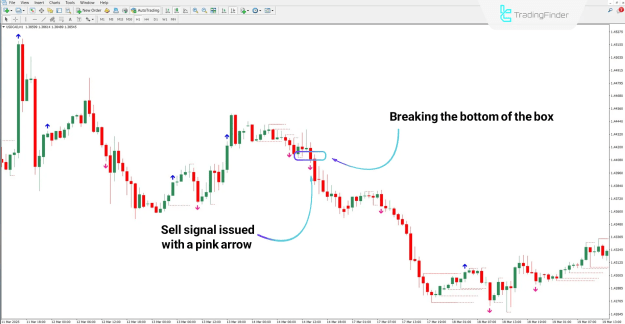
- Sell Signal: When the price drops below the lower box boundary and closes outside the range, a pink arrow is displayed, indicating a sell signal. For example, in a USD/CAD 1-hour chart, the indicator identifies downward breakouts and provides a clear sell entry.
Breakout Box with Arrow Indicator Settings
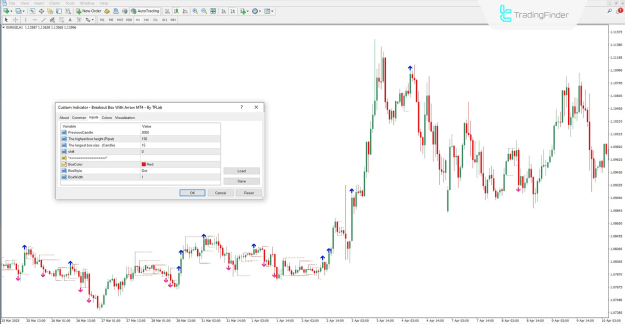
The Breakout Box indicator includes a versatile settings panel that allows customization based on trading preferences:
- PreviousCandle: Determines the display value based on the selected candle.
- Pipet: Sets the maximum height of the box in pips.
- Candle: Defines the largest box size based on candle count.
- Shift: Moves the box to the right by a specified number of candles.
- BoxColor: Configures the color of the box lines.
- BoxStyle: Adjusts the style of the box lines.
- BoxWidth: Sets the thickness of the box lines.
Conclusion
The Breakout Box with Arrow indicator effectively identifies significant price zones by drawing horizontal levels at highs and lows. When these levels are broken, it generates buy and sell signals using color-coded arrows, simplifying decision-making for traders. Compatible with multiple trading strategies and instruments, this indicator is an essential tool for both novice and experienced traders in technical market analysis.