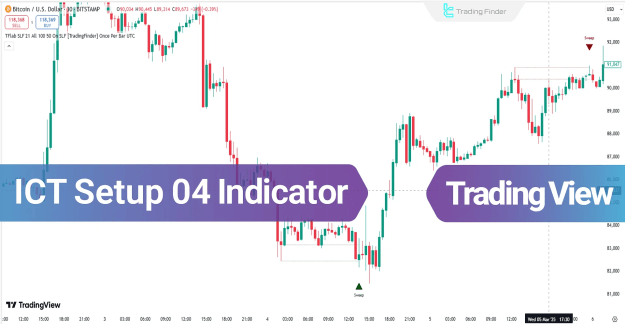
This advanced tool employs a combination of structural analysis and candlestick pattern filters to accurately detect fake breakouts. By doing so, it ensures that all generated trading signals are in alignment with genuine institutional order flow, providing retail traders with a significant edge.
You can access the Indicator from this link:
https://tradingfinder.com/products/i.../ict-setup-04/
You can access the Indicator on the TradingView website:
https://de.tradingview.com/script/O0...ake-CHoCH-BOS/
Prop Firm DrawDown Protector : Prop Firm Capital Protection Expert MT5 |Forex Money Management: Forex Trade Management Expert MT5 | ICT Concepts Indicator MT5 |Smart Money Concepts Expert MT5 | Smart Money Trap Scanner | Get a free Expert Advisor license via Telegram and WhatsApp
Core Features and Specifications of the ICT Setup 04 Indicator
Indicator Categories:
- ICT TradingView Indicators
- Smart Money TradingView Indicators
- Liquidity TradingView Indicators
Compatible Platforms:
- TradingView Indicators
Recommended Trading Skill Level:
- Advanced
Primary Indicator Type:
- Breakout TradingView Indicators
Supported Timeframes:
- Multi-Timeframe TradingView Indicators
Optimal Trading Style:
- Intraday TradingView Indicators
Applicable Trading Instruments:
- TradingView Indicators for the Forex Market
- Cryptocurrency TradingView Indicators
- Share Stocks TradingView Indicators
How the ICT Setup 04 Indicator Works: An Overview
The operational logic of the ICT Setup 04 Indicator follows a precise, multi-step process:
- It first identifies and marks significant price swings on the chart.
- The indicator then monitors for a subsequent price movement that appears to break beyond these established swing levels.
- As price moves into a predefined smart reactive zone, the tool waits for confirmation.
- A potential entry is signaled upon the formation and close of a confirmation candle (typically a Doji or a small-bodied candle) inside this zone. This represents the confirmed fake breakout and the likely start of a reversal.
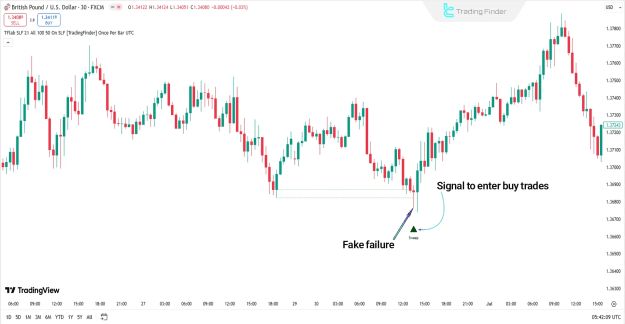
Identifying a Buy Signal in an Uptrend Scenario
- Market Context: The price is emerging from a prior downtrend.
- Trigger Action: Price executes a sweep of the previous significant swing low, tapping into sell-side liquidity.
- Reactive Zone: Price subsequently moves into the reactive zone between the swing low and the liquidity sweep level.
- Confirmation: A Doji or small-bodied candle forms and closes above the swept liquidity level. This indicates a failure by sellers to maintain control and shows evident weakness.
- Signal: A buy signal is triggered, often marked by a green arrow on the chart.
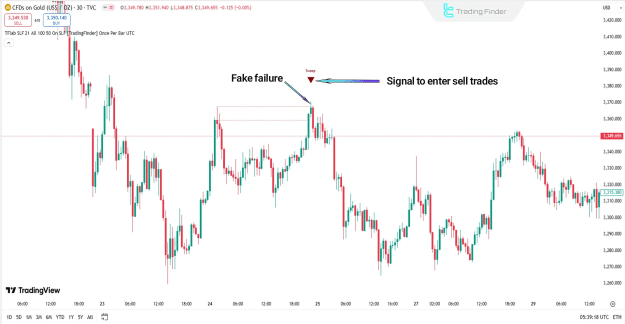
Identifying a Sell Signal in a Downtrend Scenario
- Market Context: The price is advancing within an uptrend.
- Trigger Action: Price surpasses a previous swing high, sweeping buy-side liquidity.
- Reactive Zone: Price retraces and enters the reactive zone below the swept high.
- Confirmation: A candle with a long upper wick and a small real body (a clear rejection pattern) forms. This is a definitive indication of a fake breakout.
- Signal: A sell signal is triggered, often marked by a red arrow on the chart.
Configuring the ICT Setup 04 Indicator Settings
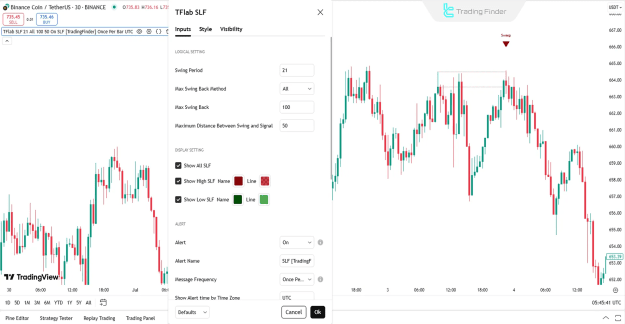
The indicator offers a detailed settings panel for customization, which can be broken down into several key sections:
Logical Settings
- Swing Period: Adjusts the sensitivity for swing point detection.
- Max Swing Back Method: Defines the algorithm used to calculate the maximum swing retracement.
- Max Swing Back: Sets the maximum allowed retracement for a swing point to be considered valid.
- Maximum Distance Between Swing and Signal: Controls the permissible distance between the identified swing point and the subsequent signal trigger.
Display Settings
- Show All SLF: Toggles the visibility of all Smart Money Concepts Fair Value Gap (SLF) levels.
- Show High SLF: Toggles the display of the upper SLF level.
- Show Low SLF: Toggles the display of the lower SLF level.
Alert Settings
- Alert: Master switch to enable or disable all alert functionalities.
- Alert Name: Allows users to assign a custom name for generated alerts.
- Message Frequency: Sets the repetition interval for alert messages.
- Show Alert time by Time Zone: Displays the alert timestamp based on a user-selected time zone.
Conclusion
The ICT Setup 04 Indicator is a powerful synthesis of swing point analysis, liquidity sweep detection, and candlestick behavior interpretation. Its primary strength lies in its ability to intelligently pinpoint high-probability reversal zones and provide traders with precise entry levels.
By integrating confirmation from market structure with pure price action principles, this tool effectively filters out false market moves and fake breakouts. Ultimately, it serves to align retail trading strategies with the underlying movements of smart money, offering a methodological approach to navigating the markets.