You can access the Indicator from this link:
https://tradingfinder.com/products/i...monic-pattern/
You can access the Indicator on the TradingView website:
https://www.tradingview.com/script/A...agon-Detector/
Prop Firm DrawDown Protector : Prop Firm Capital Protection Expert MT5 |Forex Money Management: Forex Trade Management Expert MT5 | ICT Concepts Indicator MT5 |Smart Money Concepts Expert MT5 | Smart Money Trap Scanner |Get a free Expert Advisor license via Telegram and WhatsApp
Dragon Harmonic Pattern Indicator Analysis
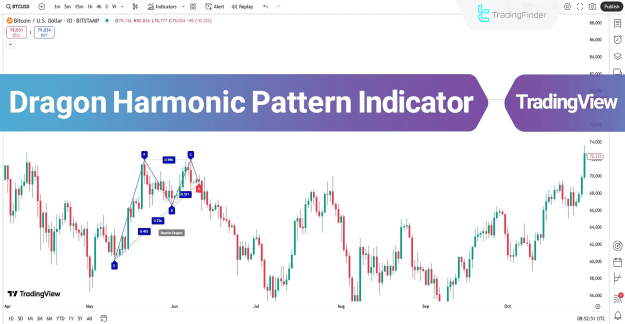
When applied to a chart, the Dragon Harmonic Pattern Indicator automatically marks the D point, highlighting the Potential Reversal Zone (PRZ) by changing its color once the formation is complete.
This functionality makes it a valuable tool for traders who rely on pattern recognition and harmonic trading strategies.
Dragon Harmonic Pattern Indicator Specifications
- Indicator Categories:
- Signal & Forecast TradingView Indicators
- Harmonic TradingView Indicators
- Chart & Classic TradingView Indicators
- Platforms:
- TradingView Indicators
- Trading Skills:
- Intermediate level
- Indicator Types:
- Reversal TradingView Indicators
- Timeframe:
- Multi-Timeframe TradingView Indicators
- Trading Style:
- Intraday TradingView Indicators
- Trading Instruments:
- Forex Market Indicators
- Cryptocurrency Indicators
- Stock Market Indicators
Bullish Dragon Pattern
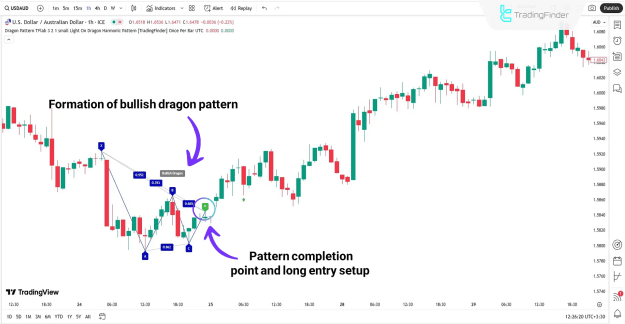
On the 1-hour USD/AUD chart, the Dragon Harmonic Pattern Indicator identifies a bullish dragon formation. Once the pattern completes, the price action shows a trend reversal.
- The “D” point acts as a buy entry signal in this setup, providing traders with a precise entry point.
Bearish Dragon Pattern
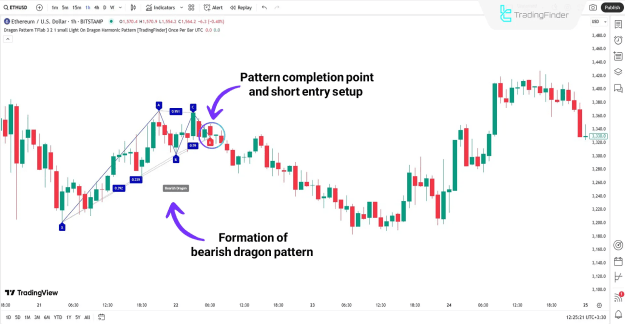
On the 1-hour Ethereum (ETH) chart, the indicator outlines a bearish dragon pattern in the form of an “M” structure. Following the completion of the dragon formation, the price undergoes a reversal, creating a potential sell entry opportunity.
- The “D” point here signals a short entry position, allowing traders to anticipate bearish momentum.
Dragon Harmonic Pattern Indicator Settings
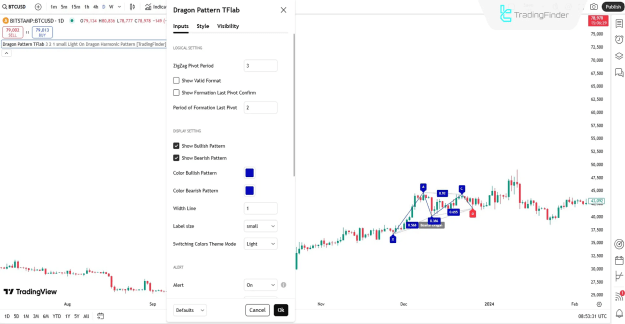
The settings panel of the indicator offers wide customization options, categorized into Logical Settings, Display Settings, and Alert Settings.
Logical Settings
- ZigZag Pivot Period: Defines the period for pivot calculations.
- Show Valid Format: Displays only valid dragon patterns.
- Show Formation Last Pivot Confirm: Confirms patterns only when point “D” is validated.
- Period of Formation Last Pivot: Sets the calculation period for the “D” point pivot.
Display Settings
- Show Bullish Pattern: Enables bullish dragon formations.
- Show Bearish Pattern: Enables bearish dragon formations.
- Color Bullish Pattern: Customizes line color for bullish setups.
- Color Bearish Pattern: Customizes line color for bearish setups.
- Width Line: Adjusts the thickness of the pattern lines.
- Label Size: Sets the label display size.
- Switching Colors Theme Mode: Applies a preferred color theme mode.
Alert Settings
- Alert: Enables alerts for pattern completion.
- Alert Name: Assigns a custom name for alerts.
- Message Frequency: Configures how frequently alerts are triggered.
- Show Alert Time by Time Zone: Aligns alerts with a chosen time zone.
Conclusion
The Dragon Harmonic Pattern Indicator is a powerful TradingView tool for identifying bullish and bearish reversal zones through Fibonacci ratios and the XABCD harmonic pattern structure.
With advanced customization features and real-time alerts, traders can adapt the indicator to their strategy, improve timing, and make informed decisions across forex, crypto, and stock markets.