You can access the Indicator from this link:
https://tradingfinder.com/products/i...oney-setup-02/
You can access the Indicator on the TradingView website:
https://www.tradingview.com/script/O...ajor-OB-Proof/
Prop Firm DrawDown Protector : Prop Firm Capital Protection Expert MT5 |Forex Money Management: Forex Trade Management Expert MT5 | ICT Concepts Indicator MT5 |Smart Money Concepts Expert MT5 | Smart Money Trap Scanner |Get a free Expert Advisor license via Telegram and WhatsApp
Examining the Smart Money Setup 02 Indicator
- Developed for the TradingView platform
- Plots demand and supply order blocks based on Smart Money concepts
- Assists traders in identifying optimal entry and exit points
- Focuses on liquidity-driven zones formed after a Major BOS
Indicator Categories
- ICT TradingView Indicators
- Smart Money TradingView Indicators
- Supply & Demand TradingView Indicators
Platforms
- TradingView Indicators
Trading Skills
- Advanced level
Indicator Types
- Reversal TradingView Indicators
Timeframes
- M1–M5 TradingView Indicators
- M15–M30 TradingView Indicators
- H1–H4 TradingView Indicators
Trading Style
- Intraday TradingView Indicators
Trading Instruments
- Forex TradingView Indicators
- Cryptocurrency TradingView Indicators
- Commodity TradingView Indicators
- Forward Market TradingView Indicators
- Stock Market TradingView Indicators
Smart Money Setup 02 Indicator at a Glance
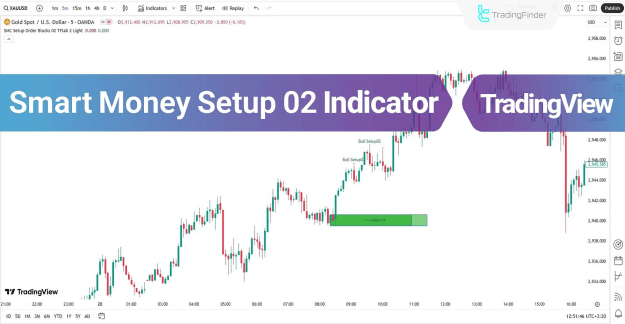
The Smart Money Setup 02 plots colored order block zones:
- Green Boxes → Demand Order Blocks
- Red Boxes → Supply Order Blocks
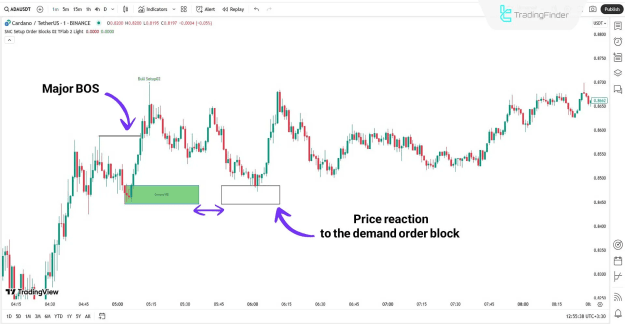
Demand Order Block
- Example: On a 1-minute chart of Cardano (ADA), a demand order block appeared before a Major BOS.
- Price rebounded upon testing the demand zone, confirming bullish continuation.
- Indicates strong buyer interest in liquidity-rich areas.
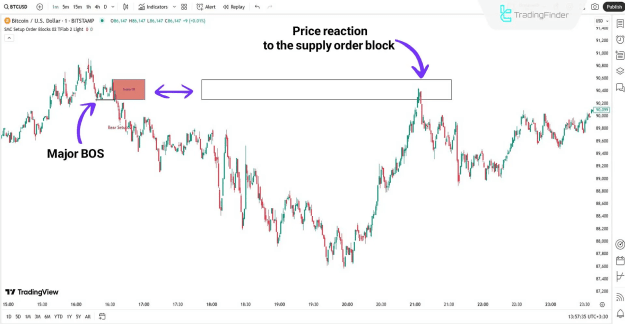
Supply Order Block
- Example: On a 1-minute chart of Bitcoin (BTC), price dropped sharply after a Major BOS.
- The supply order block was retested before the bearish trend resumed.
- This type of interaction offers a favorable opportunity for short (Sell) positions.
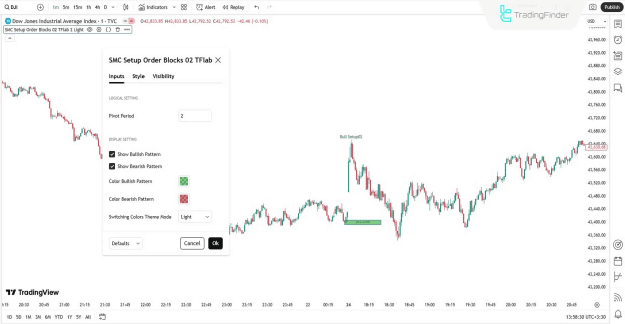
Smart Money Setup 02 Indicator Settings
The indicator provides several customization options to adapt to trading preferences.
Logical Settings
- Pivot Period – Adjusts the calculation of pivot periods.
Display Settings
- Show Bullish Pattern – Displays bullish setups on the chart
- Show Bearish Pattern – Displays bearish setups on the chart
- Color Bullish Pattern – Defines the demand OB color
- Color Bearish Pattern – Defines the supply OB color
- Theme Mode – Switches between light and dark backgrounds
Conclusion
The Smart Money Setup 02 Indicator applies Smart Money principles to identify valid order blocks that emerge before a Major Break of Structure. By plotting these supply and demand zones with clarity, the indicator enables traders to:
- Analyze trend direction
- Identify potential reversal areas
- Improve precision in entry and exit points
This makes it a valuable supply and demand tool for professional traders working across Forex, crypto, commodities, and stocks on the TradingView platform.