You can access the Indicator from this link:
https://tradingfinder.com/products/i...monic-pattern/
You can access the Indicator on the TradingView website:
https://www.tradingview.com/script/u...Reversal-Auto/
Prop Firm DrawDown Protector : Prop Firm Capital Protection Expert MT5 |Forex Money Management: Forex Trade Management Expert MT5 | ICT Concepts Indicator MT5 |Smart Money Concepts Expert MT5 | Smart Money Trap Scanner |Get a free Expert Advisor license via Telegram and WhatsApp
Adding the Nen Star Harmonic Pattern Indicator
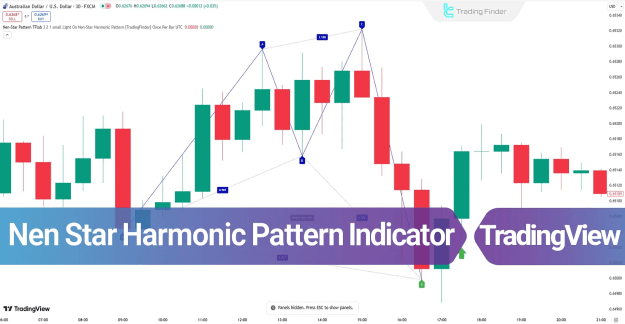
The Nen Star Harmonic Indicator can be added directly to TradingView charts. Once applied, it automatically scans market data and identifies harmonic patterns to determine potential reversal levels.
Key Features of the Nen Star Harmonic Indicator
- Category: Signal & Forecast, Harmonic, Chart & Classic Indicators
- Platform: TradingView indicators
- Skill Level: Suitable for elementary to intermediate traders
- Type: Reversal indicator
- Timeframe: Multi-timeframe functionality
- Trading Style: Intraday and short-term trading
- Markets: Forex, cryptocurrency, stocks, forward trading, and share markets
Structure of the Nen Star Harmonic Pattern
The pattern is based on five major points: X, A, B, C, and D.
- Point X: The beginning of price movement
- Point A: The end of the initial price swing
- Point B: First retracement within Fibonacci 0.382 – 0.786
- Point C: Second retracement within Fibonacci 1.13 – 1.414 of movement AB
- Point D: The critical Potential Reversal Zone (PRZ)
Indicator in an Uptrend
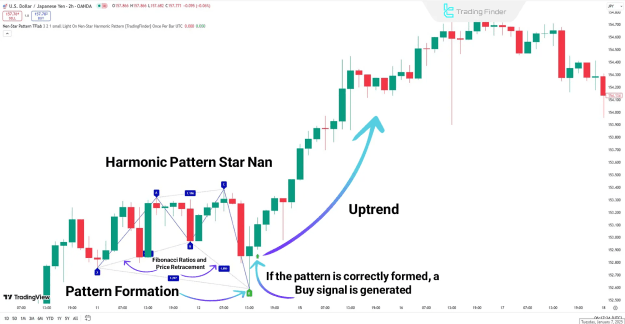
When applied in an uptrend, the Nen Star Harmonic Indicator detects a bullish harmonic structure:
- The bullish pattern forms an M-shaped structure on the chart.
- Point D marks the PRZ, signaling the end of a bearish move.
- A green arrow confirms the bullish reversal, indicating a Buy signal.
Indicator in a Downtrend
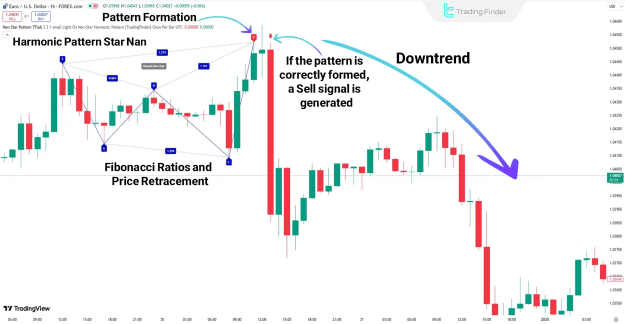
In a downtrend scenario, the indicator confirms bearish formations:
- After Point D, a bearish confirmation candle appears.
- A Sell signal is generated near Point D.
- Traders can set Stop Loss (SL) just above Point D.
- Take Profit (TP) levels are defined along the continuation of the downtrend.
- A red arrow highlights the Sell entry point.
Settings of the Nen Star Harmonic Pattern Indicator
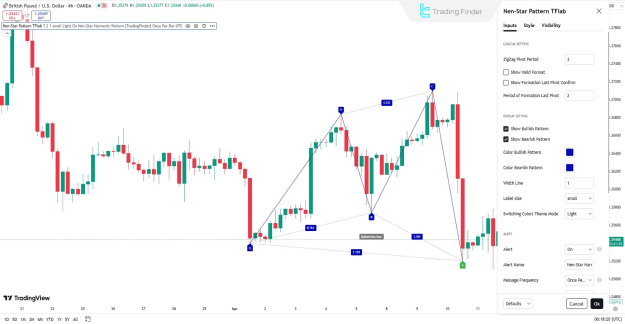
The settings are divided into three main sections:
Logical Settings
- ZigZag Pivot Period – defines pivot calculation
- Show Valid Format – highlights valid harmonic patterns
- Show Formation Last Pivot Confirm – enables pivot confirmation
- Period of Formation Last Pivot – sets last pivot calculation period
Display Settings
- Enable bullish or bearish patterns
- Customize bullish and bearish pattern colors
- Adjust line thickness and label size
- Switch between light and dark theme modes
Alert Settings
- Enable automatic alerts when a pattern forms
- Customize alert name and message frequency
- Display alerts based on preferred time zone
Conclusion
The Nen Star Harmonic Pattern Indicator is a powerful reversal tool that helps traders identify high risk-to-reward opportunities.
- Buy signals are shown with a green arrow.
- Sell signals are marked with a red arrow.
- Applicable across Forex, stocks, and cryptocurrency markets.
- Effective in pinpointing Potential Reversal Zones (PRZ) for risk management and trade optimization.
By using this indicator, traders can enhance their strategy with reliable entry and exit signals, leading to more consistent profitability.