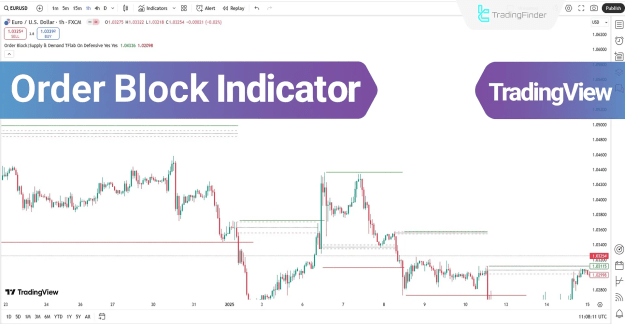
These Order Blocks (OBs) act as critical support and resistance levels, influencing whether price will reverse or continue its trend. The indicator also highlights Major High Levels and Major Low Levels using colored lines, providing traders with clear market structure insights.
You can access the Indicator from this link:
https://tradingfinder.com/products/i...w/order-block/
You can access the Indicator on the TradingView website:
https://www.tradingview.com/script/X...-CHOCH-OB-BOS/
Prop Firm DrawDown Protector : Prop Firm Capital Protection Expert MT4 | Forex Money Management: Forex Trade Management Expert MT4 |ICT Concepts Indicator MT4 | Smart Money Concepts Expert MT4| Smart Money Trap Scanner | Get a free Expert Advisor license via Telegram and WhatsApp
Key Features of the Order Block Indicator
1. Bullish & Bearish Order Blocks
- Bullish Order Blocks are marked with green boxes, indicating potential demand zones where buyers may step in.
- Bearish Order Blocks are highlighted with red boxes, signaling supply zones where sellers could dominate.
- The 50% level of each order block is displayed as a dashed line, a crucial area for price reactions.
2. Major High & Low Levels
- Major High Levels (resistance) are shown in red.
- Major Low Levels (support) are displayed in green.
- These levels help traders identify Market Structure Shifts (MSS) and Changes of Character (ChoCH).
3. Multi-Timeframe & Multi-Asset Compatibility
The Order Block Indicator works across various timeframes and trading instruments, including:
- Forex
- Cryptocurrencies
- Stocks
- Commodities
- Indices
How to Use the Order Block Indicator in Trading
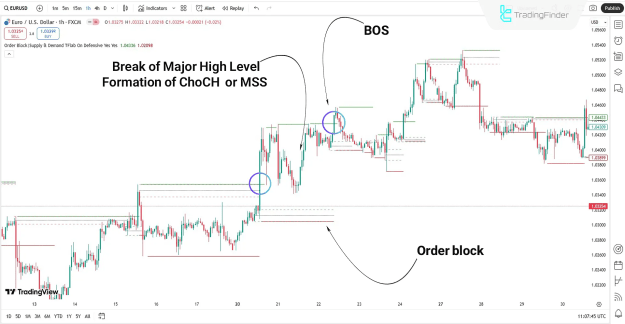
Bullish Trend Scenario (EUR/USD 1H Chart)
- When price breaks above a Major High Level, it signals a Change of Character (ChoCH) or Market Structure Shift (MSS).
- Demand Order Blocks (Bullish OBs) act as support zones, reinforcing the uptrend.
- A Break of Structure (BOS) confirms trend continuation.
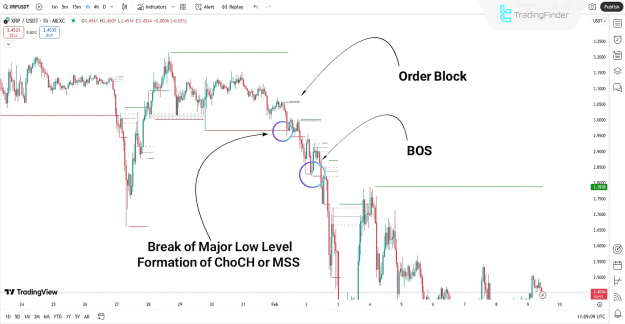
Bearish Trend Scenario (XRP 15M Chart)
- A break below a Major Low Level indicates a potential trend reversal (MSS).
- If price interacts with Bearish Order Blocks, it suggests further downside movement.
- Traders can use these zones for short entries or profit-taking levels.
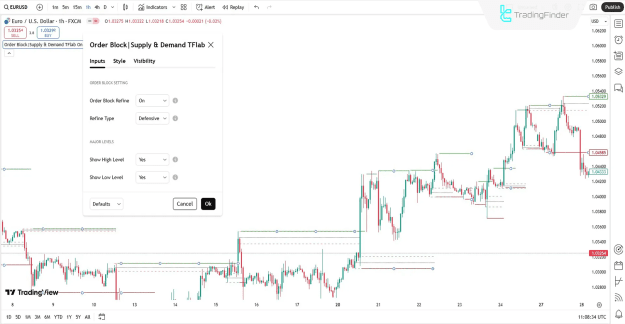
Order Block Indicator Settings
The indicator offers customizable settings to refine order block detection:
Order Block Settings
- Order Block Refine: Automatically adjusts order blocks for accuracy.
- Refine Type: Selects the refinement method (e.g., fractal-based or volume-based).
Major Levels Settings
- Show High Level: Toggles visibility of Major High Levels.
- Show Low Level: Toggles visibility of Major Low Levels.
Why Traders Use the Order Block Indicator
- Identifies Institutional Liquidity Zones – Helps spot where Smart Money is active.
- Enhances Market Structure Analysis – Clear visualization of MSS, ChoCH, and BOS.
- Improves Trade Entries & Exits – High-probability zones for reversals or breakouts.
Conclusion
The Order Block Indicator (OB) combines essential ICT and Smart Money Concepts, including:
- Market Structure Shifts (MSS)
- Change of Character (ChoCH)
- Break of Structure (BOS)
- Order Blocks (OBs)
By automatically refining order blocks and marking key levels, this indicator provides traders with a data-driven approach to market analysis. Whether trading forex, crypto, or stocks, the Order Block Indicator helps traders align with institutional order flow for higher accuracy.