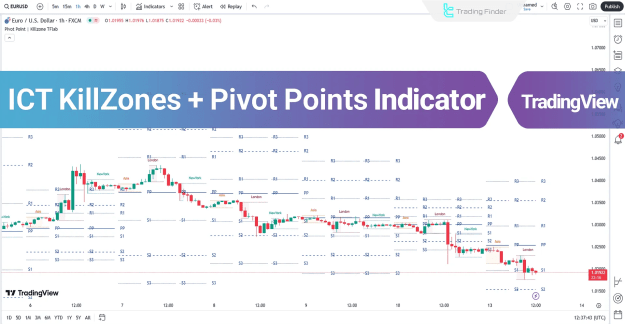
Pivot points serve as key liquidity areas in Forex, often triggering significant trading activity. Meanwhile, Kill Zones represent specific time windows within trading sessions where market volatility and order flow peak.
This indicator is ideal for traders who rely on intraday strategies, particularly in forex, crypto, and indices markets.
You can access the Indicator from this link:
https://tradingfinder.com/products/i...-pivot-points/
You can access the Indicator on the TradingView website:
https://www.tradingview.com/script/Q...rt-Resistance/
Prop Firm DrawDown Protector : Prop Firm Capital Protection Expert MT4 | Forex Money Management: Forex Trade Management Expert MT4 |ICT Concepts Indicator MT4 | Smart Money Concepts Expert MT4| Smart Money Trap Scanner | Get a free Expert Advisor license via Telegram and WhatsApp
Key Features of the ICT KillZones + Pivot Points Indicator
Indicator Categories
- Pivot Points & Fractals TradingView Indicators
- Liquidity TradingView Indicators
- Session & KillZone TradingView Indicators
Compatible Platforms
- TradingView Indicators
Recommended Trading Skills
- Intermediate
Indicator Types
- Reversal TradingView Indicators
Optimal Timeframes
- Multi-Timeframe Analysis (M15, H1, H4, etc.)
Trading Style Suitability
- Intraday Trading
Compatible Markets
- Forex Market
- Cryptocurrency Trading
- Stock Trading
- Commodity Trading
- Indices Trading
- Futures Trading
- Share Trading
Understanding Kill Zones & Pivot Points
What Are Kill Zones?
Kill Zones are high-volatility periods during major trading sessions (Asia, London, New York), where institutional traders execute large orders, leading to strong price movements.
Types of Pivot Points Included
The indicator supports four pivot point calculation methods:
- Floor Pivot Points (Standard calculation based on previous day’s OHLC)
- Camarilla Pivot Points (8 levels for precise intraday trading)
- Woodie Pivot Points (Emphasizes closing price)
- Fibonacci Pivot Points (Combines pivot levels with Fibonacci retracements)
Bullish Trend Analysis with ICT KillZones + Pivot Points
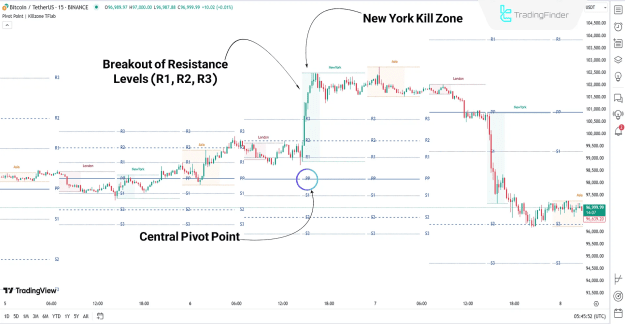
In a 15-minute Bitcoin (BTC) chart, the following conditions suggest a bullish trend:
Key Observations:
- Price remains above the central pivot (PP), indicating upward momentum.
- Upon entering the New York Kill Zone, a surge in buying pressure pushes price through resistance levels (R1, R2, R3).
- Traders can use support levels (S1, S2, S3) for strategic stop-loss placement.
Bearish Trend Analysis with ICT KillZones + Pivot Points
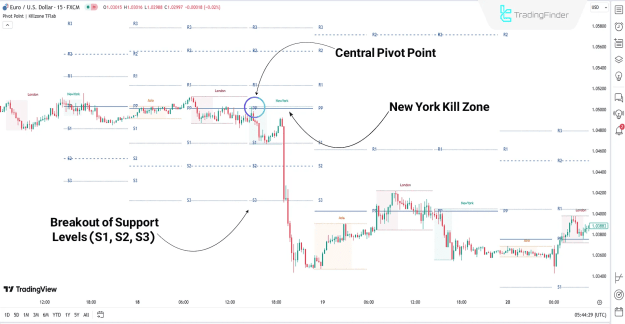
In an EUR/USD chart, the following signals indicate a downtrend:
Key Observations:
- Price rejects the central pivot (PP) and enters the New York Kill Zone, triggering a strong bearish move.
- Breakdown below support levels (S1, S2, S3) confirms bearish momentum.
- Resistance levels (R1, R2, R3) act as optimal stop-loss zones for short trades.
Indicator Settings & Customization
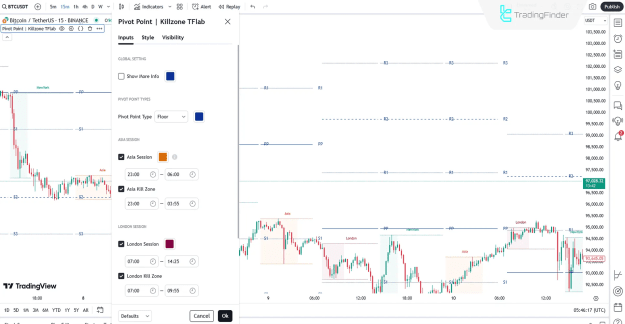
The ICT KillZones + Pivot Points Indicator offers flexible settings in TradingView:
Global Settings
- Show More Info – Displays additional pivot point details.
- Pivot Point Type – Select between Floor, Camarilla, Woodie, or Fibonacci.
Session & Kill Zone Activation
- Asia Session – Toggles Asian trading hours.
- Asia Kill Zone – Highlights high-volatility periods in Asia.
- London Session – Enables London trading hours.
- London Kill Zone – Marks volatile London session windows.
- New York Session – Activates New York trading hours.
- New York Kill Zone – Identifies peak volatility in the NY session.
Conclusion
The ICT KillZones + Pivot Points Indicator is a must-have tool for traders focusing on intraday reversals and liquidity zones. By combining pivot point analysis with volatile trading sessions, it enhances decision-making in:
- Forex scalping
- Crypto day trading
- Index futures trading
Integrating this indicator into your TradingView charts provides a competitive edge, helping you capitalize on high-probability setups during the most active market hours.