Trading Sessions and Volatile Time Zones
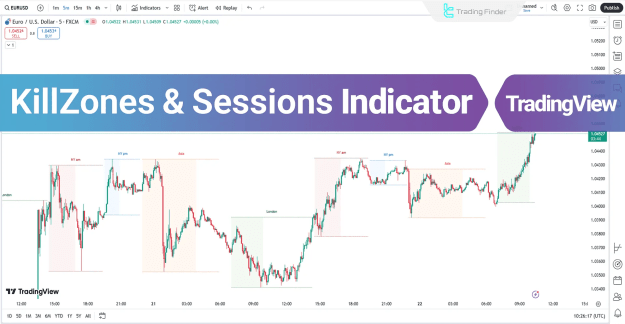
The TradingView Kill Zones & Sessions Indicator marks volatile time zones within each trading session using colored boxes on the chart. By visualizing these areas, traders can identify when the market is more likely to experience strong movements.
You can access the Indicator from this link:
https://tradingfinder.com/products/i...ones-sessions/
You can access the Indicator on the TradingView website:
https://www.tradingview.com/script/g...sia-London-NY/
Prop Firm DrawDown Protector : Prop Firm Capital Protection Expert MT5 |Forex Money Management: Forex Trade Management Expert MT5 | ICT Concepts Indicator MT5 |Smart Money Concepts Expert MT5 | Smart Money Trap Scanner |Get a free Expert Advisor license via Telegram and WhatsApp
Specifications of the Kill Zones & Sessions Indicator
- Indicator Categories:
- Liquidity TradingView Indicators
- Trading Assist TradingView Indicators
- Session & Kill Zone TradingView Indicators
- Platforms:
- TradingView Indicators
- Trading Skills:
- Intermediate level
- Indicator Types:
- Reversal TradingView Indicators
- Breakout TradingView Indicators
- Multi-Timeframe TradingView Indicators
- Trading Style:
- Intraday TradingView Indicators
- Trading Instruments:
- Forex Market
- Cryptocurrency TradingView Indicators
- Stock Market
- Commodities
Kill Zones at a Glance
Kill Zones represent specific time periods within trading sessions when liquidity increases and market volatility rises. The indicator visually plots these sessions using colored dashed lines and highlights the Kill Zones within each session.
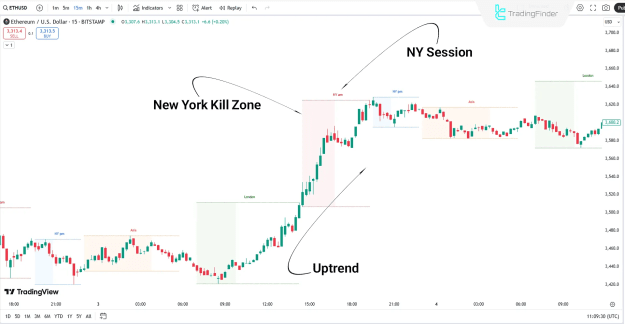
Uptrend Example
- On the Ethereum (ETH) 15-minute chart, the price entered the New York Kill Zone and continued in a bullish trend until the session closed.
- This illustrates how Kill Zones can align with upward momentum in volatile markets.
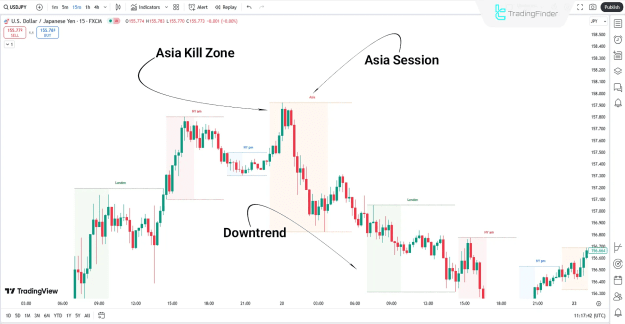
Downtrend Example
- On the USD/JPY chart, the price stayed range-bound during the New York session.
- As the market moved into the Asia Kill Zone, the price shifted into a bearish phase.
- This demonstrates how Kill Zones can also signal potential downside reversals.
Customization Options
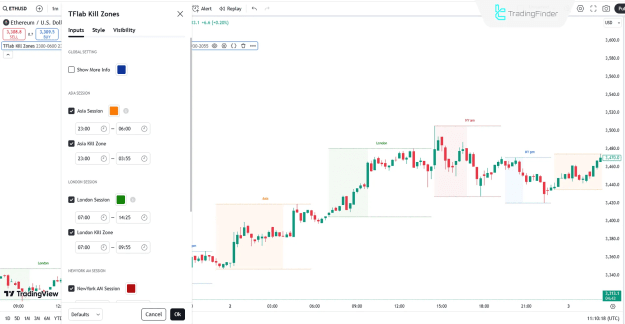
The Kill Zones & Sessions Indicator offers flexible settings, allowing traders to enable or disable sessions and kill zones as needed:
- Global Setting
- Show More Info: Displays additional market details
- Asia Session
- Asia Session: Activates Asia trading session
- Asia Kill Zone: Highlights Asia Kill Zone
- London Session
- London Session: Activates London trading session
- London Kill Zone: Highlights London Kill Zone
- New York AM Session
- Displays the New York morning session
- Highlights the New York AM Kill Zone
- New York PM Session
- Displays the New York evening session
- Highlights the New York PM Kill Zone
Conclusion
The Kill Zones & Sessions Indicator for TradingView provides traders with a structured way to track Asia, London, and New York trading sessions. By identifying Kill Zones—the most volatile periods of each session—this tool enhances intraday analysis, helping traders anticipate key market movements in Forex, crypto, stocks, and commodities.