You can access the Indicator from this link:
https://tradingfinder.com/products/i...t-maker-model/
You can access the Indicator on the TradingView website:
https://www.tradingview.com/script/4...HoCH-CSID-FVG/
Prop Firm DrawDown Protector : Prop Firm Capital Protection Expert MT4 | Forex Money Management: Forex Trade Management Expert MT4 |ICT Concepts Indicator MT4 | Smart Money Concepts Expert MT4| Smart Money Trap Scanner | Get a free Expert Advisor license via Telegram and WhatsApp
Core Features
- FVG (Fair Value Gap) Detection – Identifies inefficiencies in price delivery.
- SMT (Smart Money Technique) Divergence – Reveals divergence opportunities between correlated assets.
- Liquidity Sweep Identification – Detects liquidity grabs and stop hunts.
- MSS (Market Structure Shift) – Marks significant changes in market structure.
- CISD (Change in State of Delivery) – Tracks shifts in price delivery dynamics.
HTF PD Array – Maps higher timeframe premium and discount zones for strategic trading decisions.
Key Features and Applications
- Platform: TradingView
- Skill Level: Advanced
- Indicator Type: Reversal and Breakout Identification
- Timeframe Compatibility: Multi-Timeframe Analysis
- Trading Styles: Intraday Trading, Scalping
- Markets: Forex, Cryptocurrency, Stocks
Overview of the ICT MMXM Indicator
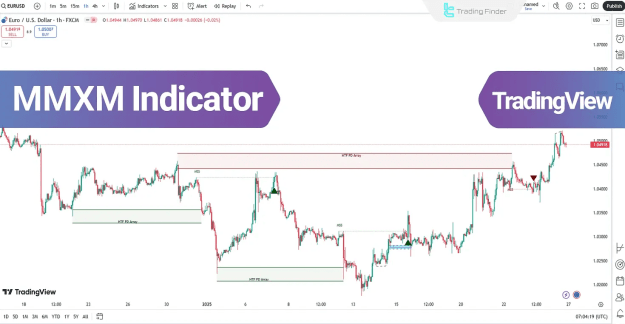
The ICT MMXM Indicator is built on the Market Maker Model (MMM), which identifies critical price zones where reversals or major directional shifts are most likely to occur. By combining ICT principles with Smart Money methodologies, it provides traders with a powerful framework for precision analysis.
Core Functions
- FVG Zones – Highlighted with colored boxes for quick recognition of Fair Value Gaps.
- MSS Levels – Marked with dashed lines and arrow markers to signal Market Structure Shifts.
- HTF PD Arrays – Represent premium/discount zones on higher timeframes, often acting as key reaction levels when retested.
Trading Applications
Bullish Trend Conditions
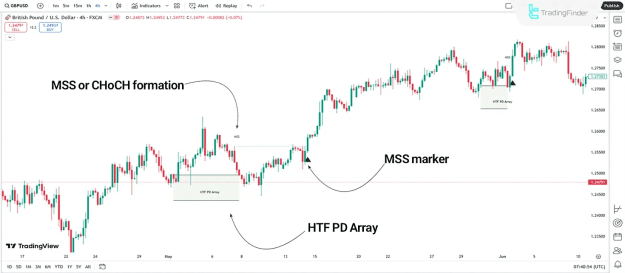
Example: On the 4H GBP/USD chart, price reacts within a higher timeframe demand zone (HTF PD).
- An MSS or CHoCH (Change of Character) forms, signaling bullish intent.
A long entry can be taken, confirmed with arrow markers and additional confluence.
Bearish Trend Conditions
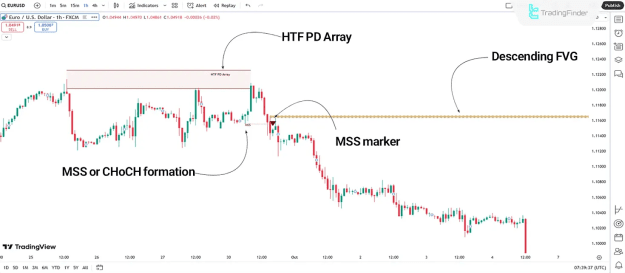
Example: On the 1H EUR/USD chart, price interacts with the HTF PD supply zone before gathering liquidity and reversing lower.
- An MSS or CHoCH confirms the bearish shift.
- Price rejects supply and declines sharply, providing opportunities for short trades.
MMXM Indicator Settings
Local Settings
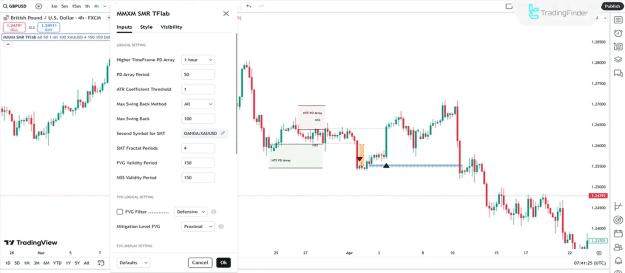
- Higher Timeframe PD Array – Enables HTF premium/discount zones.
PD Array Period – Sets the lookback period for HTF zones.
FVG Settings
- FVG Filter – Applies filtering to Fair Value Gaps.
- Mitigation Level – Adjusts balance levels for FVG handling.
- Demand/Supply FVG Display – Option to separately display demand and supply gaps.
SMT Divergence Display
- Toggle SMT divergence lines and labels from both top and bottom chart levels.
- Display Settings
- Show All HTF Levels – Displays all HTF premium/discount zones.
- HTF Level Naming – Allows custom labeling of HTF zones.
- Show All MSS Lines – Displays all MSS levels, with optional custom names.
Conclusion
The ICT MMXM Market Maker Model Indicator is a comprehensive analysis tool tailored for advanced traders. By merging ICT and Smart Money principles, it empowers traders to:
- Identify precise reversal and continuation zones.
- Detect key structural market changes.
- Define high-confidence entry and exit points.
- With its flexible customization, the MMXM Indicator adapts seamlessly to various trading strategies across forex, cryptocurrency, and stock markets.
- ATR Coefficient Threshold – Defines the allowable price fluctuation range.
- Max Swing Back Method & Value – Configures maximum retracement levels.
- Second Symbol for SMT – Allows SMT divergence analysis between instruments.
- SMT Fractal Periods – Determines the number of fractal periods for divergence detection.
- FVG Validity Period – Sets how long FVG zones remain active.
- MSS Validity Period – Sets duration for which MSS lines stay valid.