

The Macro ICT KillZones Indicator in ICT Macros is an advanced and professional tool specifically designed for traders who follow the ICT (Inner Circle Trader) trading style. This indicator, available on the TradingView platform, is engineered to help traders precisely identify critical and strategic market areas known as Kill Zones.
A key feature of this TradingView indicator is its ability to visualize Kill Zones as highlighted boxes with clear status labels. This visual aid gives traders immediate insight into the position and condition of each Kill Zone. Additionally, the indicator displays the timeframes associated with each zone, with flexible time zone settings that can be configured to UTC, a trader's local time, or New York time. These features collectively enable traders to pinpoint critical trading opportunities and refine their strategies.
You can access the Indicator from this link:
https://tradingfinder.com/products/i...ict-killzones/
You can access the Indicator on the TradingView website:
https://www.tradingview.com/script/z...Trading-Setup/
Prop Firm DrawDown Protector : Prop Firm Capital Protection Expert MT5 |Forex Money Management: Forex Trade Management Expert MT5 | ICT Concepts Indicator MT5 |Smart Money Concepts Expert MT5 | Smart Money Trap Scanner |Get a free Expert Advisor license via Telegram and WhatsApp
Overview of the ICT Macros Indicator
Developed by Michael Huddleston (ICT), the Macro ICT KillZones is a powerful instrument for identifying high-probability trading opportunities during specific market hours. This tool is designed to detect significant market events like volatility, liquidity shifts, and Fair Value Gaps (FVG), empowering traders to make informed decisions at crucial moments.
The ICT Macros indicator automatically identifies key market sessions, such as the London and New York sessions. This automation allows traders to effectively capitalize on periods of high market volatility and price corrections. It is particularly beneficial for highlighting liquidity imbalances, which helps traders pinpoint trading opportunities with greater accuracy.
A standout feature is the indicator's ability to display the sensitive times of the London and New York sessions, automatically adjusting for Daylight Saving Time (DST). This ensures the displayed times are always accurate, a vital component for time-sensitive trading strategies.
Price Action Within Kill Zones
A key feature of this TradingView indicator is its ability to visualize Kill Zones as highlighted boxes with clear status labels. This visual aid gives traders immediate insight into the position and condition of each Kill Zone. Additionally, the indicator displays the timeframes associated with each zone, with flexible time zone settings that can be configured to UTC, a trader's local time, or New York time. These features collectively enable traders to pinpoint critical trading opportunities and refine their strategies.
You can access the Indicator from this link:
https://tradingfinder.com/products/i...ict-killzones/
You can access the Indicator on the TradingView website:
https://www.tradingview.com/script/z...Trading-Setup/
Inserted Video
Prop Firm DrawDown Protector : Prop Firm Capital Protection Expert MT5 |Forex Money Management: Forex Trade Management Expert MT5 | ICT Concepts Indicator MT5 |Smart Money Concepts Expert MT5 | Smart Money Trap Scanner |Get a free Expert Advisor license via Telegram and WhatsApp
Overview of the ICT Macros Indicator
Developed by Michael Huddleston (ICT), the Macro ICT KillZones is a powerful instrument for identifying high-probability trading opportunities during specific market hours. This tool is designed to detect significant market events like volatility, liquidity shifts, and Fair Value Gaps (FVG), empowering traders to make informed decisions at crucial moments.
The ICT Macros indicator automatically identifies key market sessions, such as the London and New York sessions. This automation allows traders to effectively capitalize on periods of high market volatility and price corrections. It is particularly beneficial for highlighting liquidity imbalances, which helps traders pinpoint trading opportunities with greater accuracy.
A standout feature is the indicator's ability to display the sensitive times of the London and New York sessions, automatically adjusting for Daylight Saving Time (DST). This ensures the displayed times are always accurate, a vital component for time-sensitive trading strategies.
Price Action Within Kill Zones
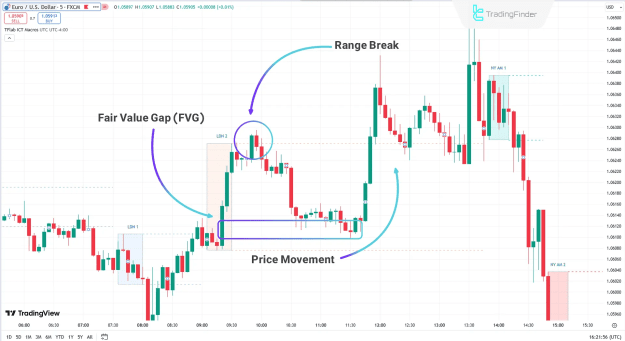
- FVG Retracement: As seen on a 5-minute EUR/USD chart, the price often reacts to a Kill Zone. After a break of a zone, creating an FVG, the price will typically retrace to fill that gap. Upon touching the FVG level, the price can begin a sharp reversal or continuation, as illustrated by a strong upward move.
- Visual Identification: The Macro ICT KillZones Indicator displays these zones as distinct boxes, allowing ICT-style traders to quickly locate high-priority areas. This clear visualization facilitates more precise trading decisions based on the chosen timeframe.
Customizing Kill Zones and Timeframes
- Colored Boxes and Labels:
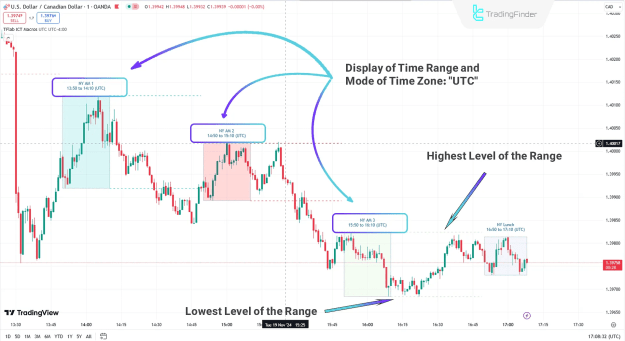
On a 1-minute USD/CAD chart, the indicator visualizes Kill Zones as distinct colored boxes with specific labels indicating their status. It also shows timeframe details and the origin of the time calculation (UTC, local, or New York time) directly on the chart. - Precise Levels:
The indicator also plots dotted lines that represent the upper and lower bounds of the Kill Zones. These lines serve as guides, helping traders identify exact breakout or reversal levels. This feature is instrumental for strategic decision-making regarding trade entry and exit points, giving ICT-style traders greater confidence.
Indicator Settings
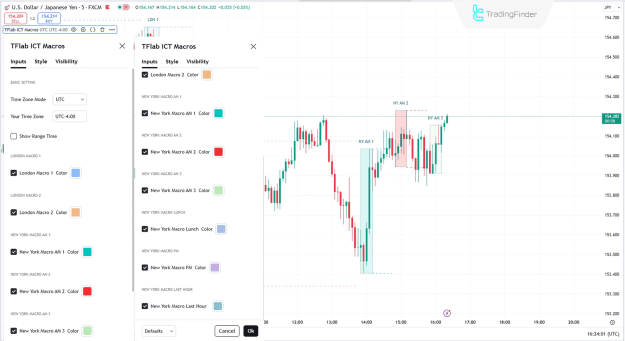
The indicator offers several customization options:
- General Settings
- Time Zone Mode: Select the time zone for the displayed data.
- Your Time Zone: Manually set your time zone (e.g., UTC -4:00).
- Show Range Time: Toggle the display of session times.
- Time Zone Range Settings
- London Macro 1/2 Color: Customize colors for the London macros.
- New York Macro AM 1/2/3 Color: Customize colors for the various New York morning macros.
- New York Macro Lunch Color: Set a specific color for the New York lunch macro.
- New York Macro PM Color: Customize the color for the New York afternoon macro.
- New York Macro Last Hour Color: Set a distinct color for the final trading hour.
Conclusion
The ICT Macro Indicator is an essential and professional tool for ICT-style traders. It excels at identifying critical time zones and Kill Zones, helping traders detect significant market events like volatility, liquidity shifts, and Fair Value Gaps (FVG).
With its visual box displays, status labels, and flexible time zone settings, the indicator offers a comprehensive way to analyze market dynamics. The inclusion of dotted lines for upper and lower bounds provides precise levels for analyzing breakout and reversal points, making this indicator a vital tool for optimizing any trading strategy.
Attached Image(s) (click to enlarge)