

You can access the indicator from this link:
https://tradingfinder.com/products/i...wing-screener/
You can access the indicator on the TradingView website:
https://www.tradingview.com/script/9...TradingFinder/
Prop Firm DrawDown Protector : Prop Firm Capital Protection Expert MT4 | Smart Money Trap Scanner | Forex Money Management: Forex Trade Management Expert MT4 |ICT Concepts Indicator MT4 | Smart Money Concepts Expert MT4| Get a free Expert Advisor license via Telegram and WhatsApp
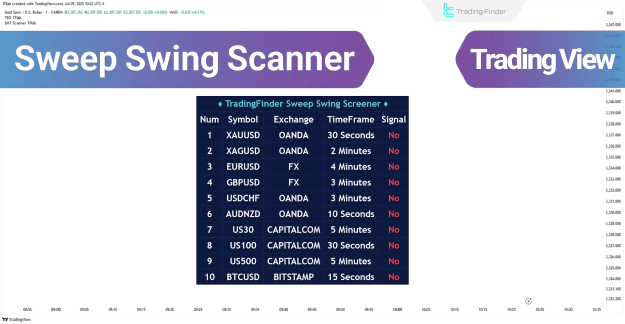
Understanding the Sweep Swing Screener
The Sweep Swing Screener is designed to identify high-probability reversal zones through meticulous analysis of market structure and liquidity dynamics. Its operational process unfolds in distinct stages:
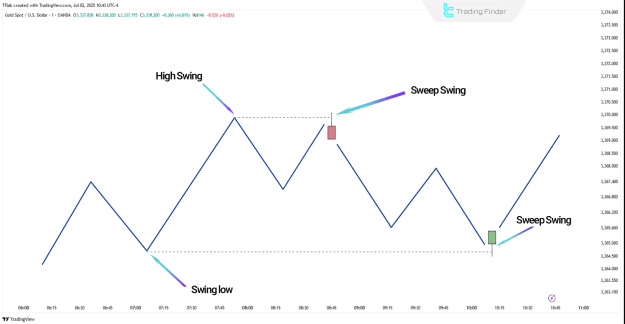
- Identifying Swing Points (Swing High / Swing Low): The screener first identifies key highs and lows, which are typically areas where liquidity accumulates and stop-loss orders are often placed. These points are crucial for establishing potential reversal zones.
- Defining the Reaction Zone: Once a valid swing point is identified, the screener establishes a "Reaction Zone." This zone extends from the swing level to the highest or lowest open/close price of the associated candle. This defined area becomes a critical region for evaluating subsequent price reactions and potential signal generation.
- Analyzing the Liquidity Sweep: In this stage, the tool assesses if the price returns to the reaction zone and breaches the swing level. The screener's core function is to differentiate between a genuine breakout and a mere liquidity sweep, thereby filtering out false signals.
- Detecting Failed Breakouts with Candle Confirmation: A crucial confirmation step involves the price closing back inside the reaction zone after a sweep, accompanied by the formation of an indecision candle (e.g., a Doji). This pattern indicates a failed breakout, suggesting that smart money has absorbed liquidity.
- A liquidity sweep has clearly occurred.
- The confirmation candle closes within the designated reaction zone.
- The time gap between the initial swing point and the confirmation candle is below a predefined threshold (e.g., 50 candles), ensuring the relevance of the detected pattern.
- Note: A valid signal is only issued when all of the following conditions are met:
Screener Behavior in Bullish Trends
When operating in a bullish trend, a buy signal is generated under specific conditions:
- After the formation of a valid swing low, the price returns to this area and temporarily drops below it. This brief breach is interpreted as a liquidity sweep, indicating that bearish pressure is being absorbed.
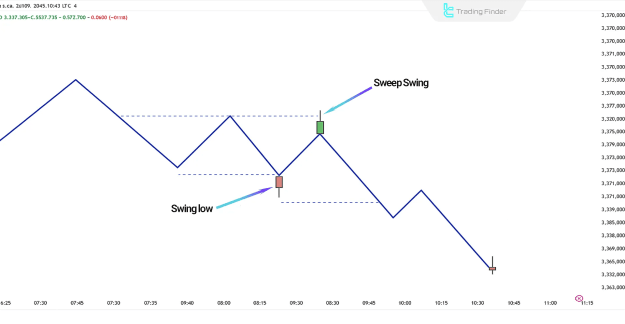
- If the price subsequently re-enters the reaction zone and closes with a confirmation candle (such as a Doji or a short-bodied candle), it signifies weakening selling pressure and a high probability of a bullish reversal.
- Upon meeting these criteria, the screener issues a buy signal and, if configured, sends an alert notification.
Screener Behavior in Bearish Trends
Conversely, in bearish trends, a sell signal is triggered when:
- Following the formation of a valid swing high, the market re-approaches that level and executes a "fake breakout" above the swing. This fake breakout is indicative of a liquidity sweep where bullish stop-losses are targeted.
- If the price then falls back below the reaction zone after the failed breakout, and an indecision or rejection candle closes within the area, it confirms a likely bearish reversal.
- The screener then generates a sell signal and, if necessary, dispatches the corresponding alert.
Sweep Swing Screener Settings
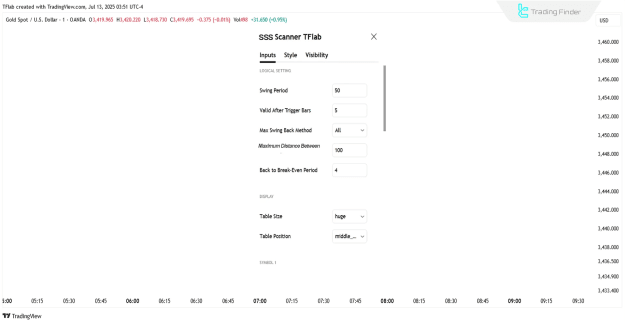
The Sweep Swing Screener offers a range of adjustable parameters, allowing users to customize its behavior to suit individual trading strategies and market conditions. These settings are broadly categorized as follows:
- Logical Settings:
- Swing Period: Defines the period used for detecting swing points.
- Max Swing Back Method: Specifies the method for evaluating past swings.
- Max Swing Back: Sets the maximum number of historical swings to consider for analysis.
- Maximum Distance Between Swing and Signal: Determines the maximum allowed time gap between the identification of a swing and the generation of a signal.
- Display Settings:
- Table Size: Adjusts the dimensions of the screener's display table.
- Table Position: Controls the on-screen placement of the display table.
- Symbol Settings:
- Symbol: Allows users to select the specific trading symbol to analyze.
- Timeframe: Enables the selection of the desired chart timeframe for analysis.
- Alert Settings:
- Alert: Toggles alert notifications on or off.
- Message Frequency: Sets how often alert messages are sent.
- Show Alert Time by Time Zone: Displays alert times based on the chosen time zone.
Conclusion
The Sweep Swing Screener stands out as a powerful tool that intelligently combines market structure, liquidity behavior, and candlestick confirmation to automatically detect high-probability reversal zones. By effectively filtering out false breakouts and zeroing in on areas of liquidity absorption, it aims to provide traders with precise entry and exit signals, enhancing decision-making in dynamic financial markets.