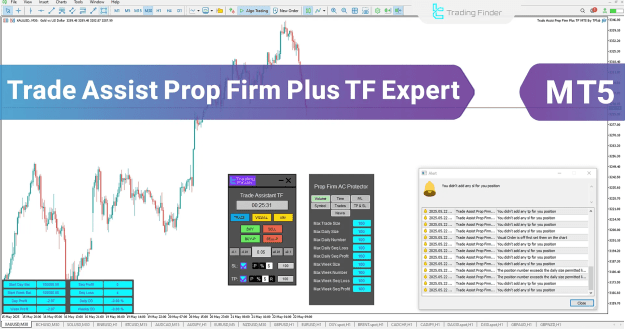
Through 7 detailed configuration tabs, traders can manage their capital limits, restrict losses, and automate key trade actions while maintaining full visual and manual control directly on the chart.
You can download it from this link:
https://cdn.tradingfinder.com/file/4...5-by-tflab.zip
You can also access the MetaTrader 4 version of this indicator through this page:
https://www.metalsmine.com/thread/13...s-tf-expert-in
For instructions on how to install:
https://www.forexfactory.com/thread/...-in-metatrader
 Specifications
- Category: Money Management / Risk Control / Trade Utility
- Platform: MetaTrader 5
- Skill Level: Advanced
- Timeframe: Any timeframe
- Trading Style: Scalping, Day Trading, Intraweek
- Markets: Forex, Commodities, Indices, Stocks
 Why Choose This EA?
This expert advisor is purpose-built to help traders:
- Remove emotional errors through risk-adjusted automation
- Choose from 3 flexible SL/TP sizing methods (Points, %, Fixed amount)
- Use visual trading lines for accurate manual entries
- Automatically prevent overtrading or trading outside allowed parameters
This EA doesn’t just place orders — it provides a complete structure for managing risk and discipline under prop firm conditions.
 Main Features & Tab Breakdown
1. Trade Tab
Control order placement with precision:
- Market and pending orders for Buy/Sell/Buy Limit/Sell Limit/Buy Stop/Sell Stop
- SL and TP entry via Points, % of balance, or Fixed $ value
- Risk/Reward calculation and real-time order visualization
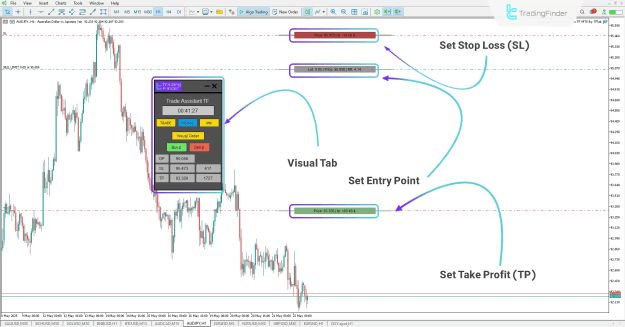
2. Visual Tab
Intuitive chart-based order entry:
- Set entry, SL, and TP using chart lines
- See live R/R ratios and profit/loss estimates
- Automatically adapts to Stop or Limit logic
- Excellent for use with ICT and S&D-based entries
3. Money Management Tab (MM)
Protect capital and manage open trades:
- Auto Break Even options (by pips, %, or profit in $)
- Advanced Trailing Stop functionality
- Batch actions: Close All / Break Even All / Close Pending
- Account Protection panel integrated for manual risk locking
4. Volume Tab
Prevent overleveraging and emotional overtrading:
- Set hard caps on lot size, number of trades, and volume
- Limit max win/loss streaks per day/week
- Encourages system-based consistency in your trading habits
5. Time Tab
Control trade timing with precision:
- Set specific trading windows for each weekday
- Automatically blocks trades outside your designated time slots
- Useful during news hours, Asian session, or after certain time-based conditions
6. Profit/Loss Limits Tab
Protect performance across sessions:
- Cap daily/weekly profits or losses in $ / % / pips
- Auto-disable new trades once limit is hit
- Preserves both capital and trader mindset
7. Symbol Tab
Filter trading by instruments:
- Allow or restrict trading to specific symbols or watchlist items
- Ideal for limiting trading to tested pairs
- Helps reinforce strategy discipline and prop firm rule compliance
 Real-World Usage
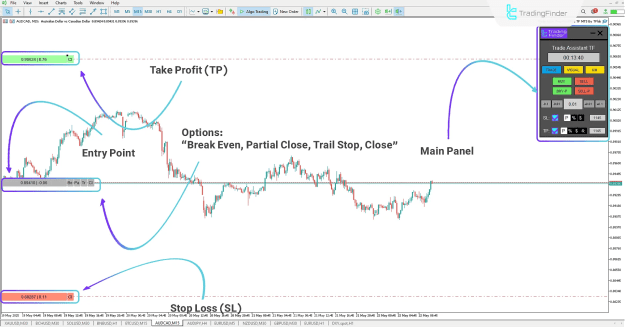
 Buy Trade Example (AUD/CAD – M15)
- Enter Buy order with SL by Points
- Define TP using a custom Risk/Reward ratio
- Auto-calculate correct lot size
- One-click execution via the Buy button
 Pending Sell Example (AUD/JPY – H1)
- Drag visual lines to set entry, SL, and TP
- See live metrics on chart: RR ratio, $ gain/loss
- Confirm trade setup with Sell.p button
 Additional Tools & Tabs
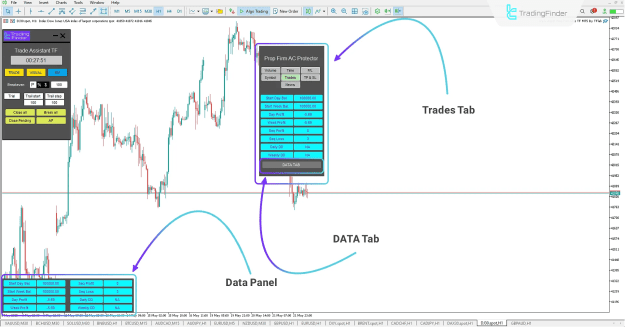
 Trades Tab
- Displays Floating P/L, Drawdown, Win/Loss sequence
- Enables DATA TAB for chart-side visual reporting
- Helps monitor trading performance in real-time
TP & SL Tab
- Ensures all trades have SL/TP defined
- Alerts trader if missing after X minutes
- Option to lock SL/TP, preventing accidental removal
 News Tab
- Shows high-impact economic events across 8 custom symbols
- Filter by impact level, symbol, and time buffer
- Automatically blocks trades before/after news for selected assets
 Activation & Licensing
This expert advisor requires an activation license.
 How to Get Licensed:
Contact the TradingFinder support team via:
- Official website chat
- Telegram or WhatsApp
Licenses are issued for both free and pro users based on plan.
Final Thoughts
The Trade Assist Prop Firm Plus TF Expert (MT5) offers advanced manual and semi-automated tools for prop firm and retail traders alike. With its rich feature set, this EA:
- Supports efficient and risk-aware trade entries
- Automates trailing, breakeven, and session controls
- Prevents account violation with hard limits
- Aligns execution with high-performance trading strategies
Whether you're managing funded accounts or optimizing personal strategies, this EA is your complete trade assistant and capital guardian on MetaTrader 5.