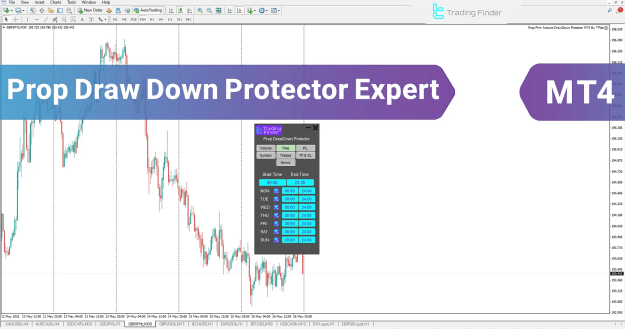
Designed for Forex, indices, and stock traders, it helps prevent breaches of account limits by integrating risk parameters directly into the trading process. With seven functional tabs and a clean user interface, it enables complete control over trade volume, timing, profit/loss thresholds, tradable instruments, and news sensitivity.
You can download it from this link:
https://cdn.tradingfinder.com/file/4...4-by-tflab.zip
You can also access the MetaTrader 5 version of this indicator through this page:
https://www.metalsmine.com/thread/13...-mt5-prop-risk
For instructions on how to install:
https://www.forexfactory.com/thread/...-in-metatrader
 EA Specifications
Categories:
- MT4 Money Management Tools
- Risk Control & Trade Assist EAs
- Prop Trading Compliance Tools
Platform: MetaTrader 4
Skill Level: Intermediate
Timeframe Support: Multi-timeframe
Trading Styles: Intraday, Day Trading, Scalping
Markets: Forex, Stocks, Indices, Synthetic Pairs
Key Functional Areas
1. Volume Management Tab
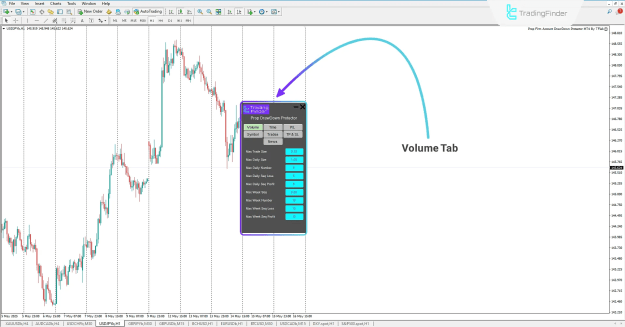
The Volume tab provides rules for limiting trade exposure across daily and weekly timeframes. You can define caps on lot size, number of trades, and sequences of wins or losses. This prevents emotional overtrading and reinforces capital preservation rules—ideal for maintaining drawdown limits.
Key Inputs:
- Max Trade Size
- Max Daily & Weekly Lot Sizes
- Max Daily/Weekly Trade Count
- Max Sequence of Losses or Profits (Daily/Weekly)
2. Time Control Tab
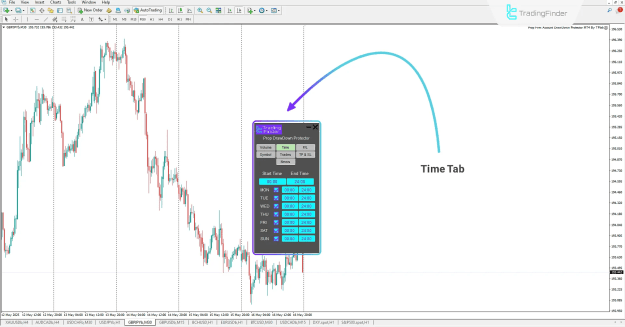
This tab helps you define when trading is permitted by day and hour. Set exact start and end times for each weekday, ensuring trades are only placed during strategic, pre-approved sessions.
Inputs Include:
- Global Start & End Times
- Day-specific activation windows (Monday–Sunday)
This is especially helpful for avoiding low-liquidity hours or volatile news periods.
3. Profit/Loss (P/L) Tab
Set maximum daily and weekly profit/loss caps using three modes—percentage, pip-based, or dollar value. Once these thresholds are hit, the EA can halt trading or send alerts.
Configuration Options:
- Max Daily/Weekly Profit
- Max Daily/Weekly Loss
- Unit Mode: Percentage / Pips / USD
This tab safeguards the account against psychological errors following streaks or sudden market volatility.
4. Symbol Restriction Tab
With this feature, you can whitelist trading instruments, allowing the EA to operate only on specific symbols. This enhances focus and ensures trades are executed within the scope of your strategy.
Symbol Selection Modes:
- Current Chart
- All Market Watch Symbols
- Manually Defined Symbols
Limiting exposure to only vetted assets is essential in structured prop trading strategies.
5. Trade Overview Tab
The Trades tab gives a real-time snapshot of your account’s status—including current balance, profit/loss, and sequences of wins or losses.
Additionally, by enabling the DATA TAB, you can see an on-screen summary of this information in the bottom-left corner of your chart—non-intrusive and accessible.
Metrics Monitored:
- Start of Day/Week Balance
- Day/Week PnL
- Current Drawdown
- Win/Loss Sequences
6. TP/SL Enforcement Tab
Here you can enforce mandatory stop loss and take profit values for every trade. If omitted, the EA can alert you after a specified time, or even restrict trade execution.
You can also set allowable movement limits for SL and TP to minimize emotional interference after trade placement.
Main Controls:
- Mandatory SL/TP Activation
- Alert Timers
- Max SL/TP Adjustment Ranges
This ensures discipline in risk-to-reward management and prevents random changes that could violate prop firm rules.
7. News Filter Tab
This intelligent feature lets you limit trade activity around high-impact news events. Choose when to start blocking trades before and after news releases across major instruments.
Features Include:
- News Filtering Timeframe (before/after event)
- Per-Symbol News Management
- All News or Most Recent News Settings
It's ideal for reducing exposure to surprise volatility and slippage.
Licensing and Activation
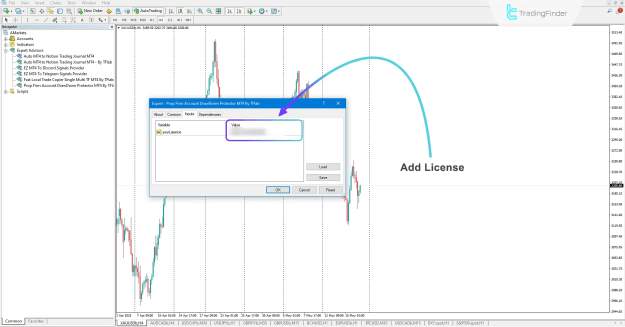
The Prop Draw Down Protector EA requires a license to operate. You can obtain a free or premium license by contacting the support team via Telegram, WhatsApp, or the website's live chat.
This step ensures compliance and keeps the EA exclusive to verified prop traders and serious users.
Final Thoughts
For prop traders seeking consistent performance, the Prop Draw Down Protector EA for MT4 is more than just a utility—it's a complete psychological and technical safeguard system.
By enforcing structured risk parameters, restricting high-risk trading behaviors, and maintaining alignment with trading plans, this Expert Advisor plays a crucial role in helping traders stay funded, stay focused, and stay profitable.
Whether you're using ICT concepts or Smart Money strategies, this EA is a highly customizable solution to integrate into any disciplined trading approach.