

 IQ Trading Bot – Smart Binary Trading in Your Browser
If you trade IQ Option and you're tired of juggling TradingView in one tab, a notepad full of levels in another, and the broker's own charting in a third
 — the IQ Trading Bot is worth a look. It's a free Chrome/Firefox extension that docks an AI signal panel directly into your IQ Option tab — reading the chart, scoring setups against built-in strategies, and (if you want) firing the trade for you. No separate app. No copy-pasting signals out of a Telegram channel at 2am.
This isn't a black-box "guaranteed profit" gadget — think of it more like a structured signal-and-execution layer that sits on top of the trading you're already doing. Here's the full breakdown: what it does, how it's built, and what to check before you flip Auto-Trade on.

 What the IQ Trading Bot Actually Is
At its core, it's a browser extension that:
 Reads the live chart on your IQ Option tab and scores setups using one of three built-in strategies
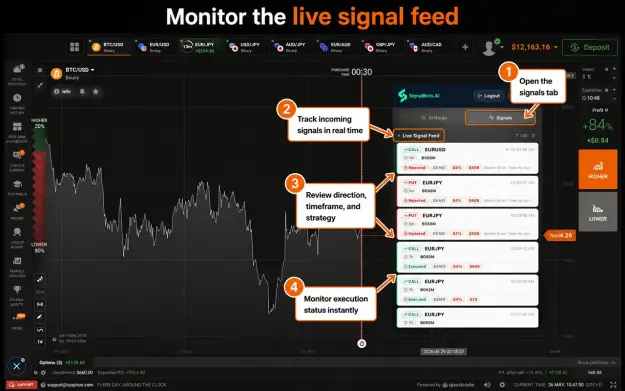
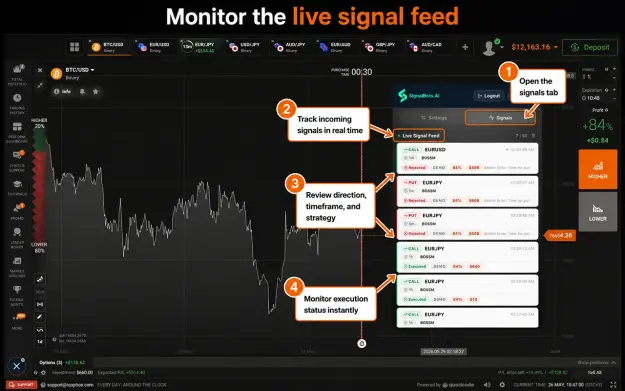
 Streams those setups into a side panel in real time — win or skip, with a reason attached
 Lets you take each signal manually, or flip to Auto-Trade so it executes for you within rules you set
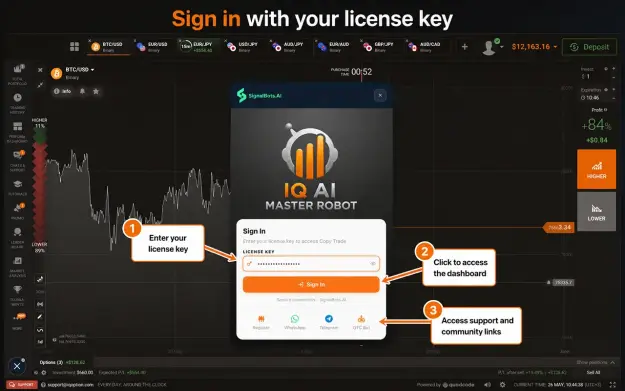
It runs locally in the browser — the developer states no chart data or trade history is uploaded to a server, and the extension never asks for your IQ Option password  . You authenticate with a separate SignalBots license key; your broker login stays exactly where it belongs — between you and IQ Option.
 Where It Plugs In
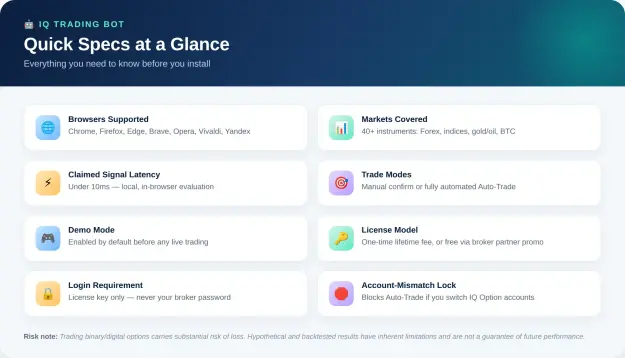
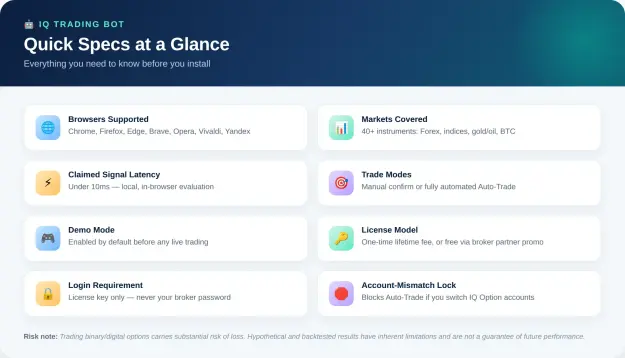
- Browsers: Chrome and Chromium-based browsers (Edge, Brave, Opera, Vivaldi) via one build; Firefox and Firefox forks (LibreWolf, Waterfox, Zen) via a separate MV3 build. Desktop only — Windows, macOS, Linux.
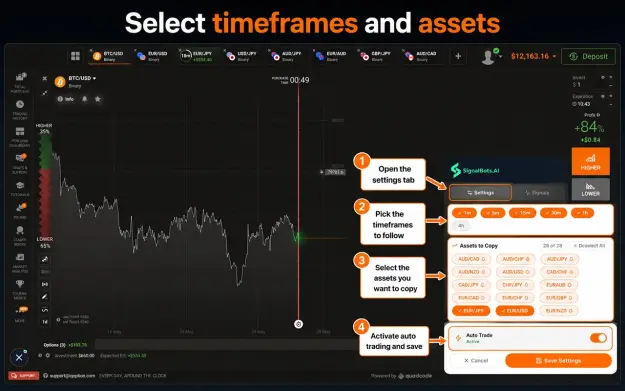
- Markets: 40+ instruments — Forex majors and crosses, gold and silver, WTI/Brent, a handful of global indices, and BTC.
- Domains: Auto-detects whichever IQ Option domain you're logged into (iqoption.com, iqbroker.com, iq-option.com, and a couple of others).
 Inside the Control Panel: Three Strategies
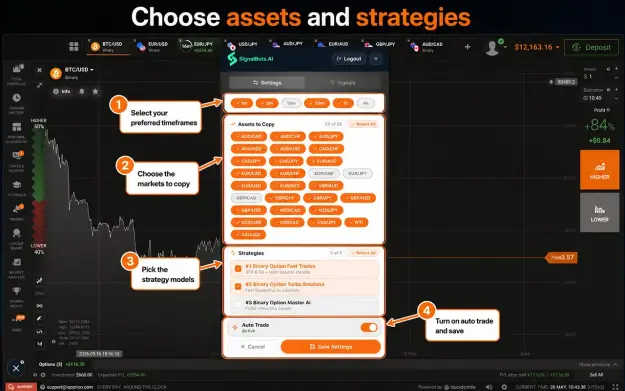
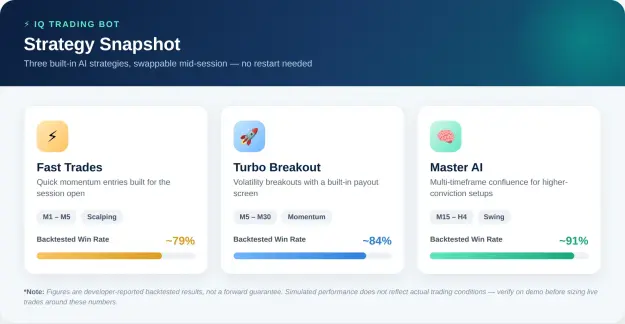
The panel ships with three pre-built strategies tuned for different parts of the session. The win-rate figures below are the developer's own backtested numbers — not a forward-looking promise, and worth verifying yourself on demo before trusting them with live size. 
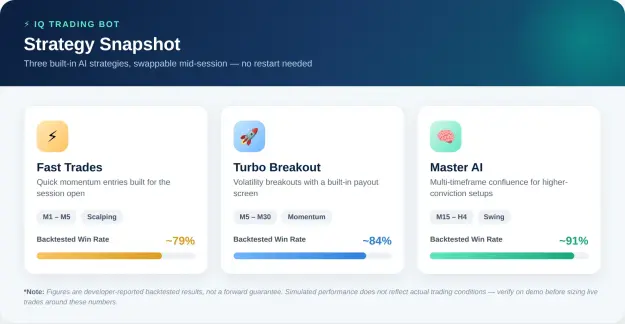
- Fast Trades — built for the open, quick M1–M5 momentum entries.
 Turbo Breakout — hunts volatility expansions on M5–M30, with a payout filter layered on top.
- Master AI — runs a multi-timeframe confluence model across M15–H4 for higher-conviction, lower-frequency setups.
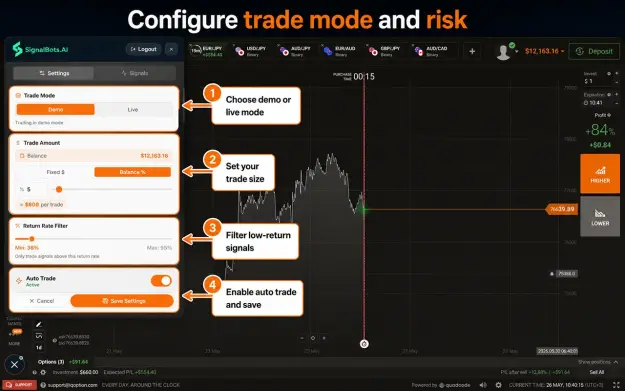
You can swap between the three mid-session without restarting the panel, and there's a Return Rate filter (default 80%) that screens out any signal where IQ Option's own payout on that asset falls below your floor.
 Risk Controls Worth Knowing About
A few design choices are clearly aimed at not letting the bot run unchecked:
 Demo-first by default — the extension installs in Demo Mode, so you can watch it work against IQ Option's simulated balance before any real money is involved.
 Account-Mismatch lock — the license binds to a single IQ Option account. Switch accounts in the same browser and the bot blocks Auto-Trade until you switch back, instead of quietly firing into the wrong account.
 Manual or Auto — both modes are first-class. Auto-Trade off just means signals stream in and you click; nothing executes without your input.
 Position sizing — fixed dollar amount or a percentage of balance, set once, applied consistently to every Auto-Trade order.
 Quick Specs at a Glance
 Getting Started
 Sign in to (or open) your IQ Option account.
 Add the extension — Chrome Web Store or Firefox Add-ons.
 Activate a license — either the one-time lifetime purchase, or the broker-partner promotion the SignalBots team can walk you through.
- Run it on Demo first, set your timeframe/strategy/return-rate filters, and only move to Live once you're comfortable with how it behaves.
 The Bottom Line
The IQ Trading Bot is a genuinely useful piece of plumbing if you already trade IQ Option and want signal generation — and optionally execution — sitting inside the same tab instead of a second screen. The local-only architecture and the account-mismatch/demo-first guardrails are sensible design choices.  That said, treat every win-rate figure as a backtested/developer-reported number, not a guarantee — run it on demo long enough to form your own view before sizing it like a proven edge.
 Risk disclosure: Trading binary and digital options carries a high level of risk and is not suitable for every investor. Hypothetical and backtested performance results have inherent limitations and do not represent actual trading; past or simulated performance is not indicative of future results. This article is informational and not financial advice — do your own due diligence before connecting any automated tool to a live account.