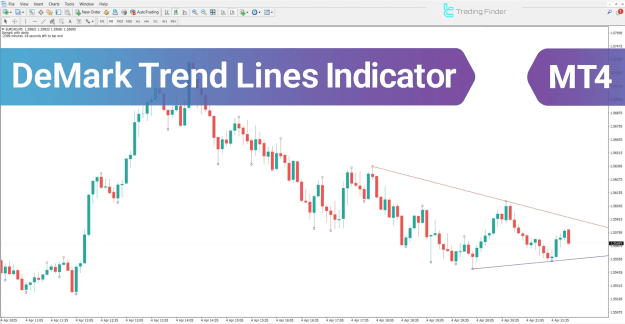


This indicator is mainly used to detect dominant trends and potential reversal points, providing traders with actionable entry signals when price interacts with the drawn lines.
 You can download it from this link:
https://cdn.tradingfinder.com/file/3...4-by-tflab.zip
 For instructions on how to install:
https://www.forexfactory.com/thread/...-in-metatrader
Prop Firm DrawDown Protector : Prop Firm Capital Protection Expert MT4 |Forex Money Management: Forex Trade Management Expert MT4 |ICT Concepts Indicator MT4 | Smart Money Concepts Expert MT4| Get a free Expert Advisor license via Telegram and WhatsApp
Key Features of the DeMark Trend Lines Indicator
The DeMark Trend Lines Indicator is categorized under multiple MT4 indicator groups and serves traders across different markets:
- Indicator Categories
- Pivot Points & Fractals MT4 Indicators
- Trading Assist MT4 Indicators
- Levels MT4 Indicators
- Platform Compatibility
- MetaTrader 4 Indicators
- Required Trading Skills
- Intermediate level
- Indicator Types
- Breakout MT4 Indicators
- Timeframes
- Multi-Timeframe MT4 Indicators
- Trading Styles
- Intraday MT4 Indicators
- Applicable Markets
- Forex MT4 Indicators
- Stock Market MT4 Indicators
- Cryptocurrency MT4 Indicators
- Forward Market MT4 Indicators
Uptrend Conditions
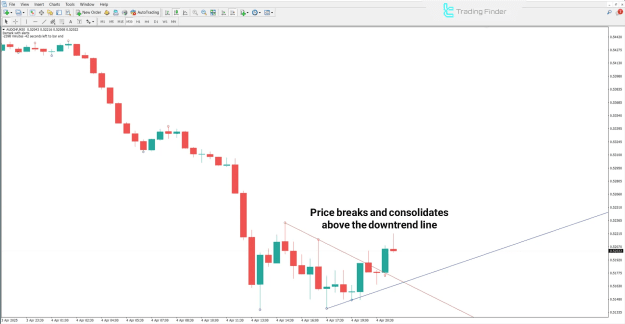
In the chart example of the AUD/CHF currency pair on a 30-minute timeframe, a breakout occurs when price moves above a downward trend line (red line).
- Once price consolidates above the breakout level, especially when aligned with the prevailing bullish market trend, the probability of a trend reversal or market structure shift increases.
Bullish signals include:
- Break of a downward trend line
- Price stabilization above resistance
- Confirmation of an uptrend continuation
Downtrend Conditions
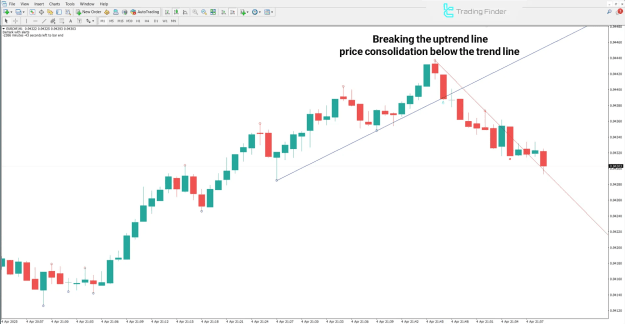
The EUR/CHF pair on a 1-minute chart demonstrates a shift in structure after forming a pivot and breaking the upward trend line (blue line).
- Once price stabilizes below this level and aligns with the broader bearish sentiment, the likelihood of a downward continuation strengthens.
Bearish signals include:
- Break of an upward trend line
- Price stabilization below support
- Confirmation of a downtrend continuation
Indicator Settings
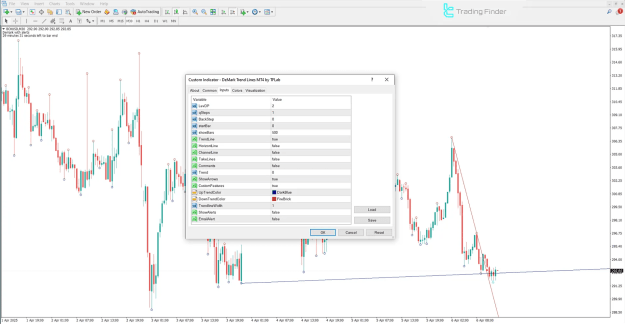
The DeMark Trend Lines Indicator comes with a variety of configurable parameters, allowing traders to adapt the tool to different market conditions:
- LevDP – Sensitivity level of trend lines (high/low points)
- Q Steps – Steps used to construct the trend structure
- Back Step – Number of candles to look back for comparison
- Start Bar – Initial candle where calculations begin
- Show Bars – Total candles considered in the drawing
- Trend Line – Enable/disable trend lines
- Horizont Line – Disable horizontal lines
- Channel Line – Display price channel lines
- Take Lines – Show take-profit markers
- Comments – Add text annotations
- Trend – Indication of trend direction
- Show Arrows – Enable signal arrows
- Custom Features – Advanced user options
- Up Trend Color – Color setting for upward trend lines
- Down Trend Color – Color setting for downward trend lines
- Trend Line Width – Adjust width of trend lines
- Show Alerts – Enable alerts
- Email Alert – Enable email notifications
Conclusion
The DeMark Trend Lines Indicator for MT4 is an essential tool for traders seeking to identify trend direction, reversal points, and key support/resistance levels.
By combining diagonal and horizontal trend lines with pivot point analysis, this indicator provides traders with clear signals for potential market opportunities across Forex, stocks, cryptocurrencies, and other markets.